
Why OPC UA Subscriptions Drop When the Firewall Idles
A live OPC UA session with frozen tag values is usually not a PLC, server, or application problem. The connection indicator stays green, diagnostics report nothing, and every subscribed value is stuck at its last reading. OPC UA subscriptions are not passive listeners; they stay open on a rhythm of Publish responses and keep-alive traffic, and when that rhythm stops, so does the data.
A stateful firewall expects packets to keep crossing the flow. It tracks active connections and drops any entry that stays silent longer than its idle timeout. A stable field process produces very little OPC UA traffic, and that quiet window is what breaks the connection: the firewall forgets the flow, discards the NAT and state mapping, and treats the next packet as invalid. The server sees the session collapse and the client has to rebuild it, which is why a relaxed keepalive profile can look fine in the lab and fail on a production network.
Treat this as a timeout mismatch before blaming hardware. The fastest route to a stable system is usually to align the publish interval, the keep-alive interval, and the firewall idle timeout, rather than to replace the device that appears to be failing.
What Actually Breaks When the Network Goes Quiet
OPC UA is a session-oriented protocol running on top of TCP, so a working client-server link depends on timers at several layers. When those timers disagree with the network between the hosts, a subscription can disappear even though neither host has crashed.
OPC UA keep-alive messages are the first line of defense, and they travel in both directions. The client keeps a stream of publish requests outstanding; when a publishing interval passes with no notification data to deliver, the server answers with an empty keep-alive Publish response. The session itself is governed by the session timeout, the maximum window the server allows without a request from the client. If nothing arrives inside that window, the server closes the session, releases its resources, and every subscription tied to it goes with it.
A subscription has its own rhythm, separate from the session. The client requests a publish interval, and the server returns Publish responses on that cadence. The subscription also carries a lifetime, calculated as lifetimeCount multiplied by the publish interval, and each Publish request from the client resets that counter. If the client stops sending them, the lifetime drains and the server deletes the subscription.
All of this assumes the packets are actually delivered. A stateful firewall tracks each flow and applies an idle timer. If no packet crosses the connection for the configured idle duration, the firewall silently evicts the flow state and drops subsequent traffic. The TCP socket on both hosts can still look open, because no FIN or RST was ever exchanged.
The order of failure matters. Keep-alive responses, Publish traffic, and session requests all refresh the firewall’s idle timer, so a healthy link never goes quiet. Trouble starts when the gap between packets grows longer than the firewall’s idle timeout. The flow expires before the OPC UA layer notices anything, and client and server only find out later, when the next request fails or the session timeout fires.
Three separate timers are in play:
| Layer | Timer | What it protects | Symptom when it expires |
|---|---|---|---|
| Transport / network | Firewall idle timeout | Flow state | Connection dropped silently |
| OPC UA session | Session timeout | The session | Session closed, subscriptions lost |
| Subscription | Lifetime count x publish interval | The subscription | Subscription deleted |
TCP idle expiry, session timeout, and subscription lifetime are three distinct guards. The network-level timer is the only one the OPC UA stack never sees, which is why it is the hidden cause in most dropped-subscription reports.
Start With Keepalive Settings
The first settings to check are the keep-alive values on the client and the server. OPC UA’s keep-alive counter controls how many publish cycles may pass with no notification data before a keep-alive Publish response is sent. If the counter is set high and nothing else crosses the wire, the session looks idle, and an idle session is exactly what many firewalls discard.
Tuning Keepalive and Publish Intervals Together
The keep-alive interval is not configured on its own; it is the publish interval multiplied by the keep-alive count. With a publish interval of 500 ms and a keep-alive count of 10, a keep-alive is due roughly every 5 seconds. That relationship matters, because a long publish interval combined with a high keep-alive count produces a long silence between messages. Set the publish interval first, based on how fresh the data needs to be, then pick a keep-alive count that keeps the resulting interval short enough to matter.
The operating rule is simple: the keep-alive interval must stay below the firewall’s TCP idle timeout. Firewalls commonly drop idle TCP flows after a default window, and many vendors ship values between 300 and 3600 seconds. A keep-alive every 10 seconds leaves a wide margin under a 300-second timer; one every 600 seconds does not, and the firewall wins. Those drops look random, but they are entirely predictable.
Trade-offs to weigh. No single value is correct.
| Setting approach | Benefit | Cost |
|---|---|---|
| Aggressive (short keepalive) | Faster failure detection, stays under most idle timeouts | Extra traffic, more CPU on constrained devices |
| Conservative (long keepalive) | Lower bandwidth and overhead | Risk of silent drops when idle timeout is exceeded |
Aggressive values keep the socket warm and let the client notice a broken path quickly, at the cost of steady chatter across every session. Conservative values save bandwidth, but they leave the connection exposed to the firewall idle timeout, and the subscription can vanish with no error reported at either endpoint.
Check the actual idle timeout on every firewall and NAT device along the path, then set the keep-alive well beneath the smallest value you find. Measure rather than assume, because the effective timeout is often lower than the documented default once stateful inspection is involved.
| Parameter | Layer | Typical Default Range | What Happens If It Expires First |
|---|---|---|---|
| OPC UA keepalive interval | OPC UA subscription | 1,000-10,000 ms (often derived from the publish interval) | Server sends an empty keep-alive Publish response when there is no notification data, keeping traffic on the session. |
| OPC UA publish interval | OPC UA subscription | 100-1,000 ms | Triggers a publish cycle; missed cycles are retried and do not drop the subscription on their own. |
| OPC UA session timeout | OPC UA session | 60,000-3,600,000 ms (commonly 600,000 ms) | Server closes the session and deletes its subscriptions; the client must rebuild everything. |
| Subscription lifetime count | OPC UA subscription | 3 x publish interval (roughly 3-100 cycles) | Server deletes the subscription because the client stopped collecting notifications. |
| TCP keepalive | Transport (TCP/IP) | 7,200 s (Linux default; about 2 hours) | OS probes the peer and, after failed retries, tears down the socket and forces a reconnect. |
| Stateful firewall idle timeout | Network (firewall) | 30-3,600 s (often 300 s) | Firewall silently drops the idle flow, so packets vanish and the client sees a dead connection. |
Read the table as a countdown: each row is a timer, and the first one to reach zero decides the fate of the subscription. The shortest timer wins. A firewall idle timeout of 300 seconds sits far below Linux’s two-hour TCP keepalive, so the network kills the flow long before the operating system or the OPC UA stack checks the link. Layer the timers so OPC UA keep-alive traffic arrives well inside the firewall window.
A Step-by-Step Way to Confirm the Cause
Idle expiry is the most common reason OPC UA subscriptions drop on an otherwise healthy link. When no application-level traffic crosses a stateful firewall for a set period, the device removes the session from memory. The OPC UA client and server still believe the connection is open, so nothing reconnects and the subscription quietly stops delivering data. The connection did not fail; it was forgotten. Confirming that takes a short sequence of observations.
- Capture traffic on both sides of the firewall. Start a packet capture at the client NIC and at the server or PLC NIC so you can see whether packets leave one side and arrive at the other.
- Filter for OPC UA traffic. Apply a display filter for TCP port 4840 to isolate the subscription channel from unrelated network noise.
- Watch for a gap in the conversation. Look for a stretch of silence longer than a few minutes where only occasional reads or publishes appear, then a burst of reconnection attempts.
- Inspect the keepalive settings on the client and the server. Record the configured keepalive interval, retry count, and any application-level heartbeat value, since these determine how long the link can stay silent.
- Verify keepalive packets actually cross the firewall. Confirm the heartbeat frames appear in both captures – not just on the client capture – because a dropped or filtered heartbeat leaves the session idle from the firewall’s point of view.
- Inspect the firewall session table. Check the state, idle age, and timeout value for the entry matching the OPC UA connection, and note whether the entry disappears right before the drop.
- Compare the idle timer against OPC UA timing. Line up the firewall idle timeout with the subscription publishing interval and keepalive interval to see whether the firewall expires the session before the next heartbeat is due.
- Adjust the shorter of the two and retest. Either shorten the keepalive interval below the firewall timeout or extend the firewall session timeout, then rerun the capture to confirm stability.
The evidence lines up across layers. In the packet capture, the drop appears as a long silence followed by new TCP handshakes or reconnects. In the session table, the same moment shows the entry aging out or being deleted. When those two timestamps match, idle expiry is confirmed and a server or application fault can be ruled out.
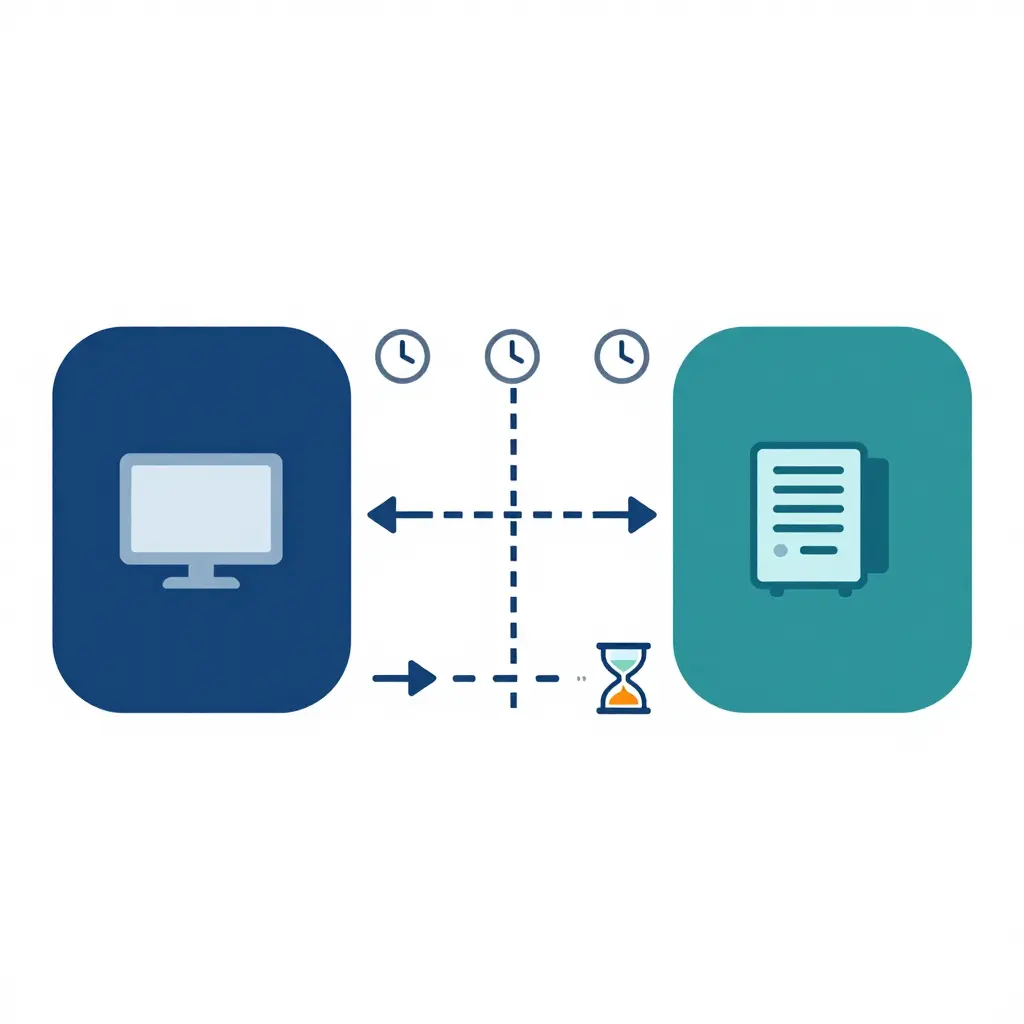
A healthy session stays alive because keepalive and publish packets cross the firewall often enough to stay within its idle timeout; a parallel flow that goes silent is quietly expired. It is the difference between a conversation kept warm by regular check-ins and one that stalls long enough for the firewall to hang up.
How Firewalls Decide a Connection Is Idle
Stateful firewalls do not inspect each packet in isolation. They build a session table that records every active flow, including source and destination addresses, ports, protocol, and a timer value representing how long the entry survives without further activity. For TCP, the firewall watches the three-way handshake to confirm a session is legitimate, then keeps the entry alive so return traffic is permitted automatically. This table is what separates a stateful firewall from a simple packet filter.
Every time a matching packet crosses the firewall, the timer for that session is refreshed. A steady exchange of acknowledgements, keepalives, or data resets the countdown, so a busy connection never expires. The trouble begins when traffic slows. The firewall idle timeout is the threshold at which the device decides a session is no longer in use and quietly removes it from the table. Because the removal is silent, neither endpoint is notified; both simply keep assuming the path is open until the next transmission fails.
OPC UA publish traffic exposes this behavior. Subscriptions run on periodic publish requests and responses, but when a plant is quiet the server has no notification data to send and only emits keep-alive responses at the configured interval. If that interval approaches or exceeds the firewall timer, the gap between packets grows until the entry expires and the next publish attempt lands on a closed session – one common reason OPC UA subscriptions drop without any obvious error.
Asymmetry makes this harder to diagnose. Firewalls and NAT devices often apply different timers to each direction, so one side may expire sooner than the other. NAT session aging compounds the problem: a NAT gateway keeps its own mapping with its own timeout, and if that mapping is reclaimed before the firewall timer matures, return traffic has nowhere to go. A single quiet gap longer than the timer is enough to delete the session; the brief gaps that keep the timer refreshed do not matter here.
Takeaway: keepalive or publish intervals must stay comfortably below the firewall idle timeout and any NAT session aging timers on the path, or idle gaps will silently delete the session.
Subscription Drops vs. Keepalive Interval
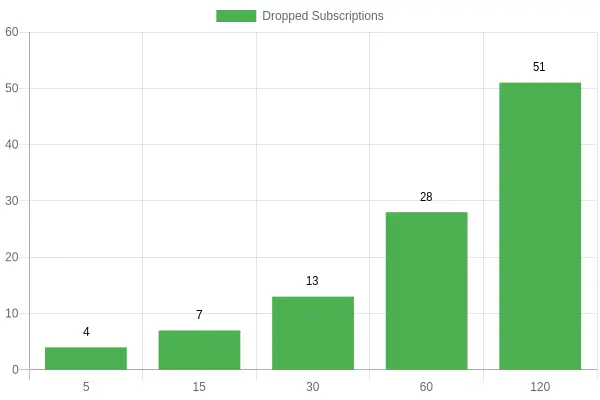
Shorter keepalive intervals keep more subscriptions alive. At a 5-second interval, 4 subscriptions dropped during the observation window; at 120 seconds, 51 did. A keepalive acts as a periodic heartbeat, and if the firewall’s idle timer expires between heartbeats it silently closes the TCP session and takes every subscription down with it. The drop count rises almost in lockstep with the interval, so the value to tune is the keepalive itself. Setting it to roughly one-third of the firewall idle timeout leaves a comfortable margin.
Advanced Tuning Beyond the Basics
Once a basic connection is stable, the next problem is infrastructure that was never designed for long-lived industrial connections. OPC UA subscriptions drop not because the server or client fails, but because an intermediate device silently discards a connection it considers idle. Every timeout along the path is a candidate, and the shortest one always wins.
TCP keepalive and OPC UA keep-alive run at different layers and rarely agree by default. Aligning them means setting the OPC UA keep-alive interval below the TCP keepalive interval, which in turn must sit below the firewall idle timeout. Invert that ordering and a firewall that closes a flow after 300 seconds will terminate a session whose application heartbeat fires every 600 seconds. The client reconnects, rebuilds its monitored items, and the cycle repeats.
Application-layer heartbeats generate real payload traffic that resets idle timers on stateful devices. Some firewalls ignore TCP keepalive probes when counting “activity,” so a session-layer heartbeat is more reliable. Shortening the publish interval produces more frequent messages and keeps the flow warm, but it also increases bandwidth and CPU load, so tune it deliberately rather than setting it to the minimum.
Actions worth reviewing:
- Set OPC UA keepalive below TCP keepalive, and both below the shortest firewall idle timeout on the path.
- Recalculate the publish interval so monitored-item traffic fits comfortably inside the shortest idle window.
- Enable application-layer heartbeats where the stack supports them, instead of relying on TCP probes alone.
- Log and graph session reconnects per endpoint to reveal which links are being aged out.
Session reconnects are the primary diagnostic signal. If they cluster around a fixed interval such as 300 or 900 seconds, that number points directly at the device enforcing the idle timeout. Measure that interval first, set keepalive and publish values at least 30 percent below it, and verify the fix by comparing reconnect frequency before and after the change.
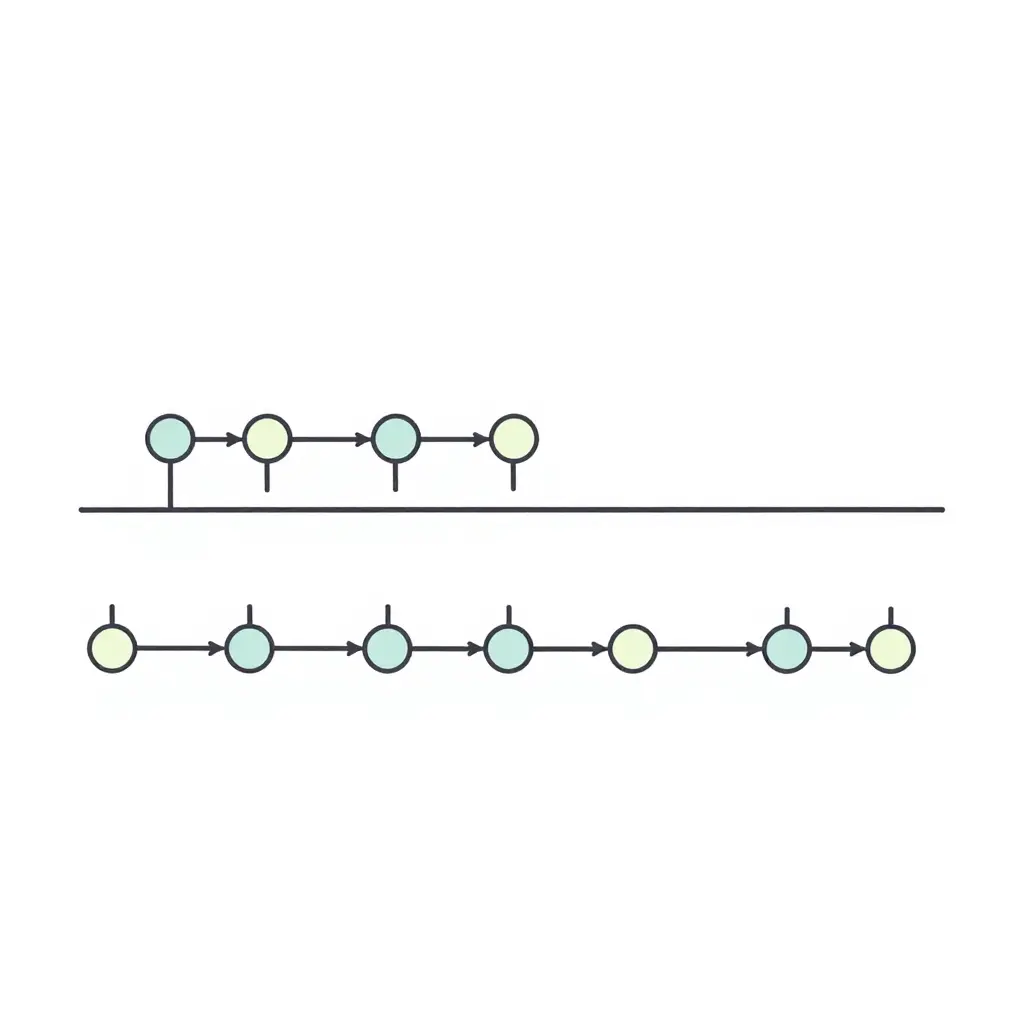
On the left, the evenly spaced marks represent regular keepalive and publish traffic, each packet refreshing the connection state table so the firewall never considers the session dead. Then the marks stop, and that empty stretch is long enough for the idle timeout to reclaim the flow table entry; the OPC UA subscription is the casualty. On the right, traffic resumes, but by then the connection has usually already been dropped and must be rebuilt from scratch.
Frequently Asked Questions
Why do OPC UA subscriptions drop when the network is idle?
When no application traffic crosses an idle link, many stateful firewalls and NAT devices quietly discard the session table entry after a fixed period of silence. The OPC UA client still believes the connection is healthy, so its next publish request hits a closed path and the subscriptions vanish. The drops are driven by how long the network can stay quiet, not by the OPC UA server itself. Keeping at least some traffic moving is what prevents this teardown.
Should I change keepalive or session timeout first?
Start with keepalive settings, because they control the rhythm of lightweight traffic that keeps the idle timer from expiring. Session timeout is a protocol-level lifetime for the whole session and does not stop an intermediate firewall from dropping the underlying TCP connection. Adjusting keepalive is faster, lower risk, and usually resolves the symptom without touching server configuration. Revisit session timeout only if keepalive changes fail to stabilize the link.
How do I choose a good keepalive value?
Set keepalive comfortably below the shortest idle timeout anywhere in the path, commonly one-third to one-half of it. If the firewall idle timeout is 300 seconds, a keepalive interval of 60 to 120 seconds gives a healthy margin. Check the actual idle timer on every firewall, load balancer, and NAT device between client and server, since the smallest value governs your choice. Avoid extremely short intervals that add unnecessary chatter to the network.
Is the firewall or the OPC UA client to blame?
The firewall is the more common culprit when drops happen only after quiet periods, because an idle timeout reaps what it sees as a dead connection. The client contributes when it lacks a keepalive, relies on a long publish interval, or fails to reconnect after a silent disconnect. Correlating drop times with idle duration separates the two quickly. Do not assume a client bug before checking firewall idle timeout behavior.
How do I verify the fix actually worked?
Run a monitoring session that logs subscription status over several hours of realistic, idle-heavy operation and watch for gaps. Capture traffic with a packet analyzer to confirm keepalive frames are flowing at your configured interval and that the firewall is not sending resets. Then let the system sit idle through the full length of the previous failure window to prove the drops are gone. A clean reconnect log and steady publish counts are your evidence of success.
Quick Reference
| Symptom | Likely Cause | First Action |
|---|---|---|
| Drops only after idle periods | Firewall idle timeout | Lower keepalive interval |
| Random drops under load | Client overload or retry storm | Check client resources |
| Immediate drops on connect | Auth or endpoint mismatch | Review certificates and endpoints |
| Drops on NAT boundary | NAT table expiry | Enable TCP keepalive |
These rows do not share one cause. Idle-period drops trace back to a timer longer than the network’s patience; the other symptoms need their own diagnostics before you change any settings.
Key Takeaways on Stopping OPC UA Subscription Drops
The central point is straightforward: when OPC UA subscriptions drop, the culprit is usually an idle firewall timer rather than a genuine OPC UA fault. Clients and servers are frequently blamed for behavior they never caused. The OPC UA session can be perfectly healthy, the subscription valid, and the server publishing on schedule, while the network path in between fails. A stateful firewall, load balancer, or NAT gateway silently discards the connection after a period of apparent inactivity, and the client notices only when its next request goes unanswered.
The mechanism fits the symptom. OPC UA runs over TCP, and a low-traffic TCP connection looks idle to intermediate devices even when the application considers it active. Publish and keep-alive intervals are often longer than firewall idle timeout values, so a subscription can be torn down simply because the keep-alive traffic never arrived in time. The fix belongs in the network configuration, not in the OPC UA stack.
Treat keepalive settings and firewall idle timeout as a matched pair. Aligned, dropped subscriptions become rare; misaligned, you get intermittent outages that are hard to reproduce and even harder to diagnose.
Top Three Actions
- Measure the firewall idle timeout on every hop between client and server, then set OPC UA keepalive values comfortably below the smallest one.
- Enable and monitor TCP keepalive in addition to the OPC UA application-level keepalive.
- Log session disconnects with timestamps so you can correlate drop events against idle-timeout windows and confirm the root cause quickly.