
The Boot-Rub Truth: Your Frame Guards Are Supposed to Fail First
Peel the backing off a fresh kit and the first damage usually shows up in a predictable place: the strip of frame guards your boots rub against. It’s the most common wear point on a dirt bike graphics install, and it isn’t a defect or weak adhesive. It’s friction. Every lap, boot soles drag grit, mud, and heat across that strip until the print gives out.
That’s normal wear, and there’s a cheap fix for it: a sacrificial layer.
A sacrificial layer is a clear or color-matched overlay that sits over the boot-rub area and takes the scuffs instead of the artwork. When it finally wears through, you peel it off and apply another. The graphics underneath stay intact, and you skip the cost of a new set.
Before you spend money on a fresh full graphics kit, protect the set you already own. A sacrificial layer is one of the least expensive ways to extend graphics life, and it takes minutes to install.
Why Boots Grind Through Frame Guard Graphics
Frame guard graphics don’t wear out because the vinyl is weak. They wear out because boot soles work like sandpaper.
Ride with your knees gripping the bike, stand through a rough section, or shift weight in a corner, and the sole presses against the guard and slides. That’s friction, repeated thousands of times a ride.
Grit makes it worse. Sand and dust embed in boot rubber and are harder than the vinyl they press against. Once they’re trapped between sole and guard, every small movement cuts into the surface: friction plus grit equals abrasion.
The damage adds up ride after ride:
- Repeated contact cycles – every stand, sit, and weight shift rubs the same spot again and again.
- Embedded abrasive particles – grit works like sandpaper held flat against the decal.
- Vibration – engine buzz and terrain chatter push particles deeper and speed up the breakdown.
Over time the top vinyl layer thins, the printed ink scuffs, and edges start to lift. Vinyl decals sit on the surface to absorb abuse so the frame underneath doesn’t. If you keep reprinting the same design, choose tougher custom graphics built for high-contact zones, or add a sacrificial layer you can replace before you reprint.
The High-Wear Zones You Should Expect
Your dirt bike graphics rarely wear evenly. They fail in a few predictable spots where boots, knees, and legs grind against metal and plastic. Knowing these wear zones lets you reinforce them before a single decal peels.
- Frame guard side panels – Your boots grip and slide here on every corner, scuffing the surface constantly; expect rubbed-through color and lifted edges right at the arch of your foot.
- Airbox shrouds near the boot – The inner shroud collects steady knee and calf drag, producing shiny, faded patches that flake away in horizontal streaks within a few rides.
- Lower subframe edge – Heel and boot soles catch this lip during standing transitions, slowly grinding the print at the sharpest bend.
- Swingarm near the heel – Constant heel contact during braking and cornering wears this zone into a rough, sanded finish, and it’s often where the artwork disappears first.
- Seat-to-tank junction – Thighs and hips rub this seam while you shift weight, thinning the graphic along the top edge.
Treat these five as your priority areas. Clear film over each one before you reprint is inexpensive, and it lets the frame guards and the rest of the kit stay sharp while the cheap layer takes the beating.
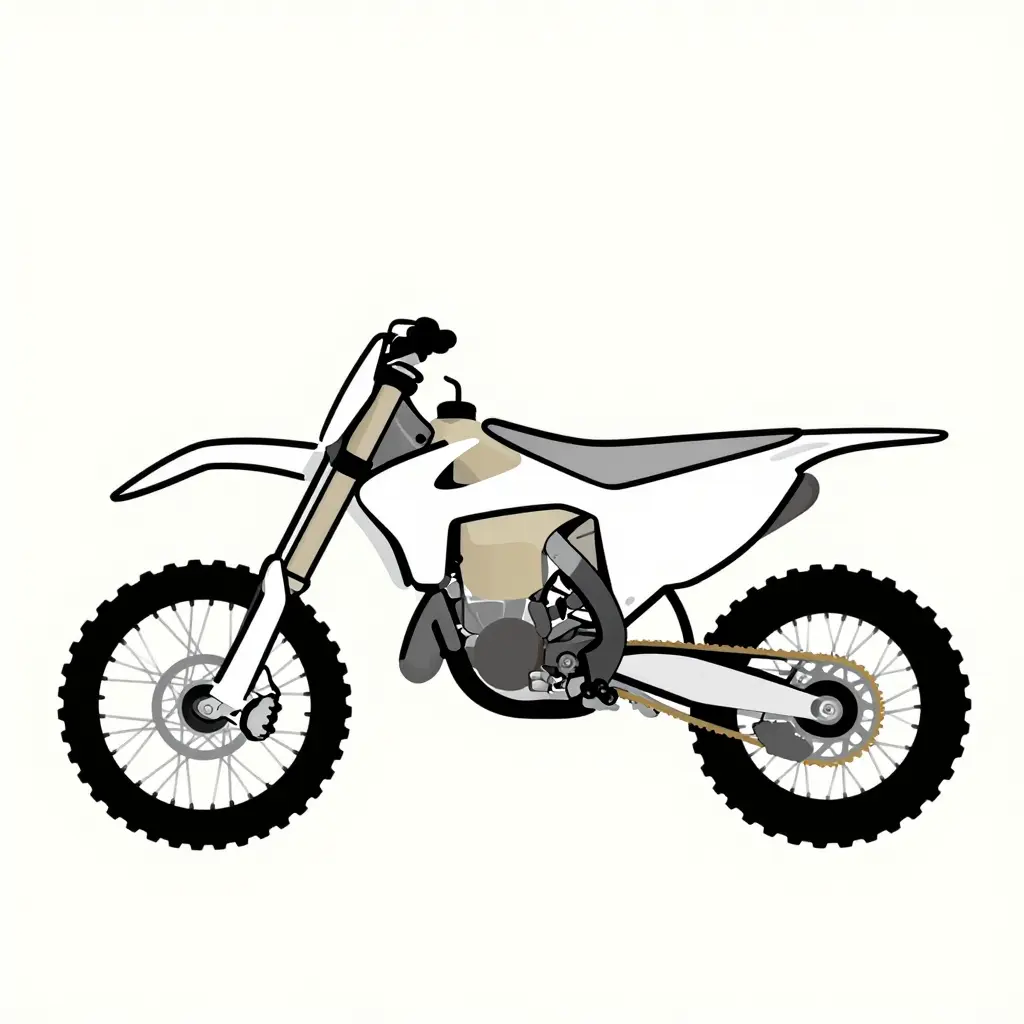
What a Sacrificial Layer Actually Does
The idea is to move wear onto a disposable layer.
Instead of letting your boots grind into the printed surface, you cover the high-rub zones with a thin, cheap, replaceable film. Foil, a spare decal, or a strip of clear guard material all work, as long as it’s easy to peel off and swap out.
That film is the sacrificial layer. It gets destroyed so your artwork doesn’t. Your boot still scuffs and the frame guard still takes abuse, but the damage lands on a throwaway surface instead of the color, logos, and finish you paid for.
Abrasion wins eventually; the only real question is which layer it eats first. Point it at a cheap scrap of film and you get three benefits:
- Abrasion is redirected – the rub zones take the hit, not the print.
- The reprint is delayed – the good graphics survive longer.
- Cost drops – replacing a strip of film costs a fraction of a full kit.
Think of it like a screen protector on a phone. Nobody regrets the cheap film that cracked instead of the glass. With custom dirt bike graphics, that overlay is a low-cost way to extend the life of the set.
Don’t fight the wear – decide where it lands. Put it on the sacrificial layer, swap that layer when it looks rough, and leave the artwork underneath alone.
Sacrificial Layer Options Compared
What you put over the graphics depends on how hard you ride and how often you reprint. The table below matches each material to its strengths.
| Material | Abrasion Resistance | Cost per Application | Ease of Replacement | Best Use Case |
|---|---|---|---|---|
| Clear protective film | Moderate | Low | Moderate | Invisible wear protection directly over graphics |
| Rubber frame guard pads | High | Medium | Easy | High-contact zones where boots rub the frame hardest |
| Thick vinyl overlay strips | High | Low | Easy | Cheap sacrificial reprints on budget |
| Grip tape | Very high | Low | Easy | Extreme friction areas that also need extra grip |
Riders who log serious hours on the track or trail are better off with durable rubber frame guard pads or grip tape; they handle the most repeated boot scuffing and swap out in seconds. Casual riders get plenty of protection from a low-cost clear protective film or thick vinyl overlay strips applied before they reprint their dirt bike graphics kit.
How to Choose Your Sacrificial Layer
Match the material to your riding style and how hard your boots actually rub the frame. A trail rider who taps the guards now and then has different needs than a motocross rider grinding through ruts all day. Get this match right, and your sacrificial layer absorbs the abuse instead of the graphics underneath it.
Turn the comparison into a decision
Find your discipline, read across, and you have your material.
| Rider Type | Rub Intensity | Best Sacrificial Layer | Why It Works |
|---|---|---|---|
| Trail | Light, occasional | Thin clear vinyl film | Cheap, flexible, easy to swap |
| Enduro | Medium, sustained | Medium-density TPU strip | Grippy and hides scuffs |
| Motocross | Heavy, constant | Thick molded plastic guard | Takes deep boot wear daily |
Decision logic by discipline
- Enduro riders: your boots stay planted for hours, so choose a medium-density layer that resists gradual abrasion without feeling bulky.
- Motocross riders: constant grip and ruts mean go thick, a molded plastic guard that shrugs off the worst rubbing.
- Trail riders: you rarely grind the guards, so a thin, low-cost film is enough.
The recommendation rule
Protect first, reprint last. If you already own dirt bike graphics kits, add the sacrificial layer before the scuffs start, so you replace a cheap strip instead of paying for a full reprint. If you’re starting fresh, look at our fresh custom graphics kits and protect them from day one.
A fresh custom graphics kit should be protected from day one, not after the damage is done.
Graphics Wear Rate Under Boot Rub: A Three-Scenario Comparison
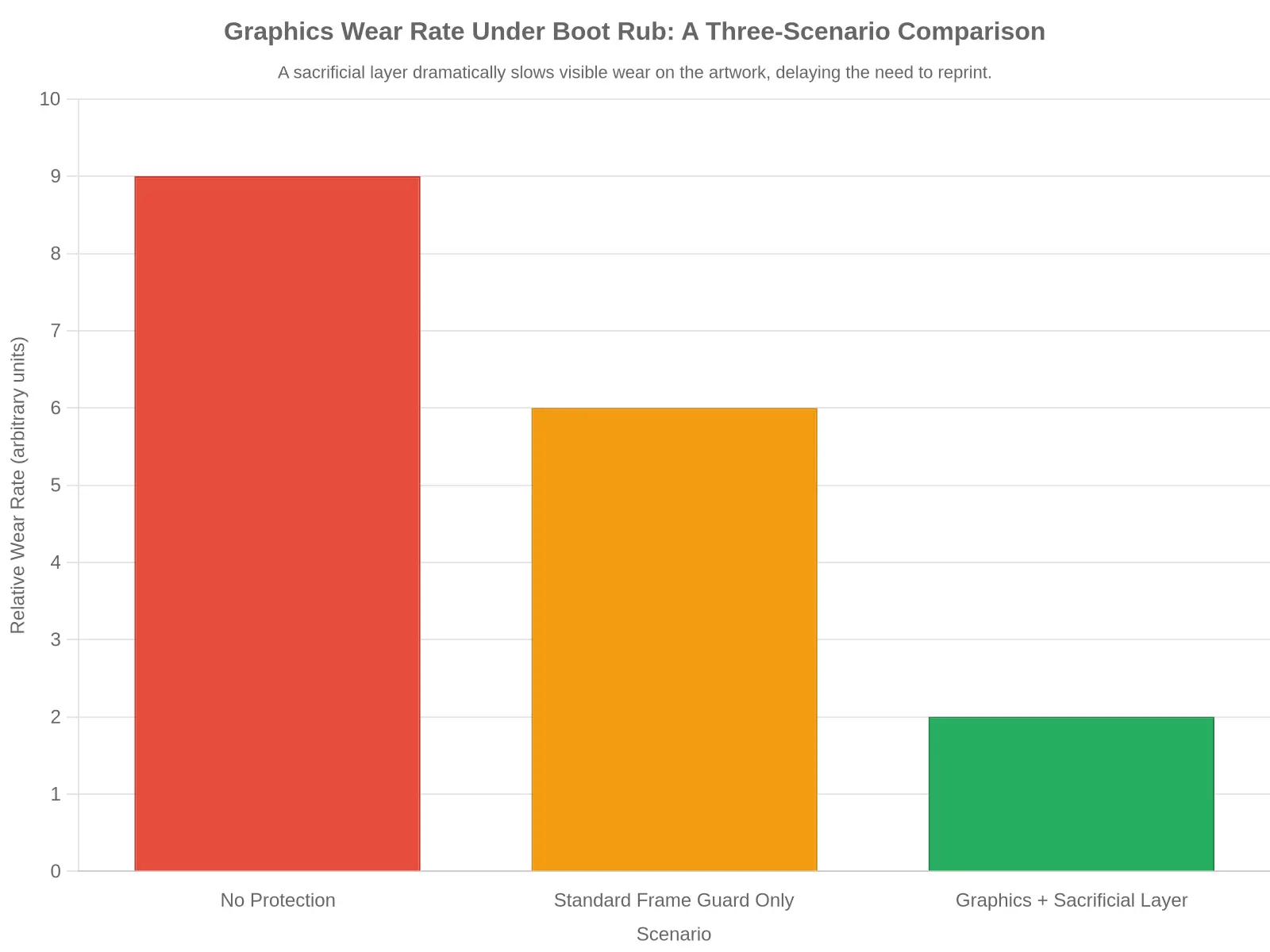
The chart above plots the typical graphics wear rate under boot rub across three setups. With no protection, the frame and the artwork take the full brunt of your boot, so wear runs fastest. A standard frame guard alone absorbs part of that friction, cutting the wear rate by about a third. But when you apply a sacrificial layer over the graphics, the outer film takes the abuse and the printed artwork underneath barely registers on the scale.
| Scenario | Relative Wear Rate (arbitrary units) |
|---|---|
| No protection | 9 |
| Standard frame guard only | 6 |
| Graphics + sacrificial layer | 2 |
Caption: A sacrificial layer slows visible wear on the artwork, delaying the need to reprint.
Step-by-Step: Adding a Sacrificial Layer Before You Reprint
Your boots grind against the same spot on your frame guard every lap, so give that zone a cheap, replaceable shield. Here’s the process.
- Clean the frame guard surface. Wipe away mud, dust, and chain lube with a mild degreaser and a clean microfiber cloth until the panel feels squeaky and smooth.
- Remove every trace of oil or residue. Spray the area with isopropyl alcohol and wipe again, since any leftover film will stop the sacrificial layer from sticking.
- Let the surface fully dry. Wait several minutes for all moisture to evaporate, as applying film to a damp panel traps water and weakens the bond.
- Cut the sacrificial film to size. Lay the clear film over the rub zone, then trim it so it covers the wear area with a small overlap of a few millimeters on every side.
- Apply it with even pressure. Peel the backing, press the film down from the center outward, and smooth it with a squeegee to push out air and avoid bubbles.
- Trim the edges cleanly. Run a sharp blade along the border, keeping a steady angle, then lift away the excess for a tidy, factory-looking finish.
- Rotate or replace the layer at set intervals. Swap in a fresh piece every few rides, or sooner once you spot scuffs, so the film takes the abuse instead of your design.
Do This Before You Order a New Reprint
Add the sacrificial layer before you order a fresh reprint and your new set stays protected from day one, so you won’t need to reorder nearly as often. If you’re ready to refresh your look, browse our customizable dirt bike graphics and pair them with a sacrificial layer.
Do this and the frame guard stays protected, each reprint lasts longer, and the bike keeps looking sharp season after season.
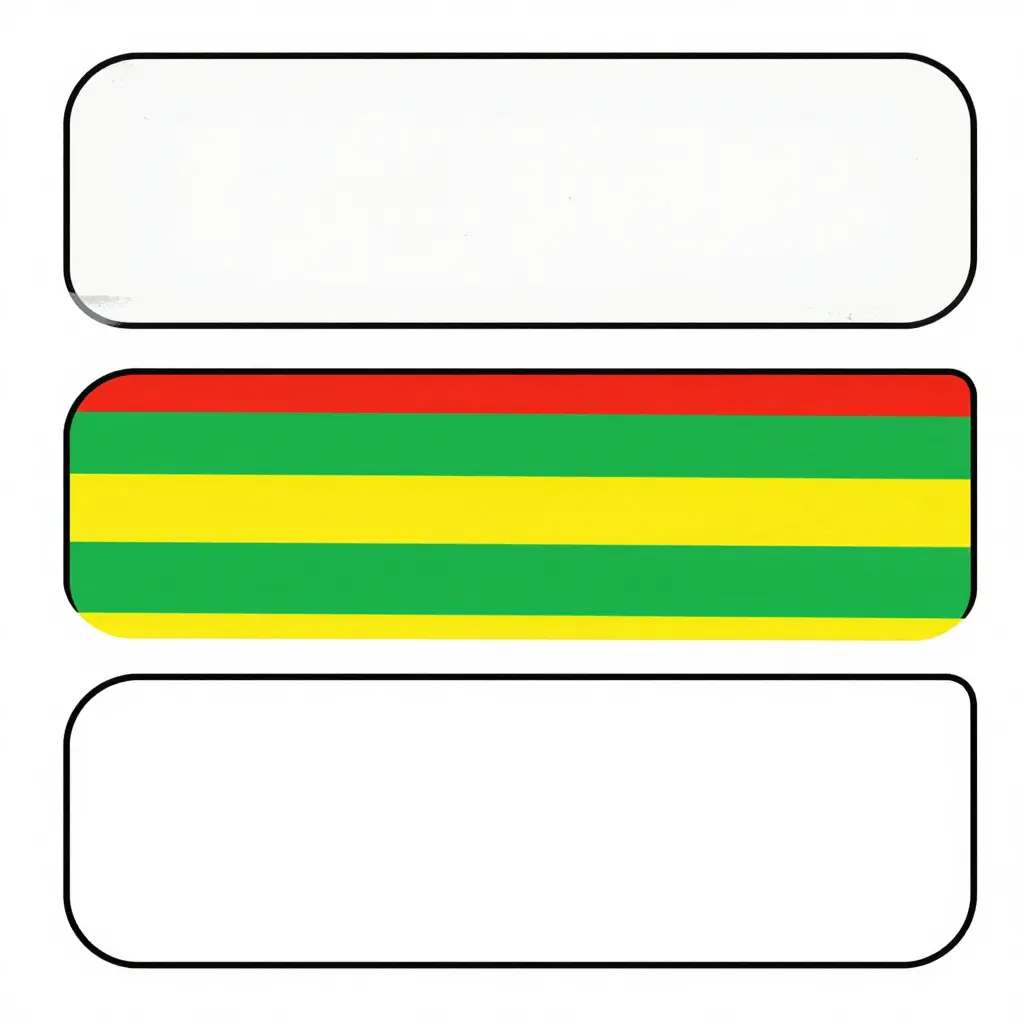
The cross-section shows the stack: the bottom band is the structural plastic frame guard, the middle band is the printed vinyl artwork you actually care about, and the top band is the thin sacrificial film that meets your boot every time you grip the bike. Boots rub, dirt grinds, and the top layer absorbs it. When it finally wears through, peel it off and apply a fresh sheet; the vinyl underneath is still sitting there untouched. That’s the point of building graphics that last – you replace the cheap, replaceable top layer instead of reprinting the whole kit.
When to Replace the Sacrificial Layer and When to Reprint
A scratch on your dirt bike graphics isn’t automatically damage. If you’re running a sacrificial layer, that mark usually means the layer is doing its job. The clear film sits on top of your artwork and absorbs boot rub, knee brace contact, and trail grit so the printed design underneath stays sharp.
The check that matters is on the layer, not the artwork.
Inspect the Sacrificial Layer, Not the Artwork
The printed artwork is the expensive, hard-to-replace part. The sacrificial layer is cheap and meant to be consumed. Inspect the layer every few rides and match what you see to the table below.
| Stage | What you see | What it means | Action |
|---|---|---|---|
| Surface scuffing | Light scratches, dull boot rub marks | Normal wear – layer still protecting | Keep riding |
| Thinning | Layer looks glossy or translucent in spots | Protection is wearing thin | Monitor after each ride |
| Breakthrough | Printed graphic visible through the layer | Layer has failed in that spot | Prepare for reprint |
Surface scuffing is expected – ignore it. Thinning is your cue to watch that spot more closely. Breakthrough is the warning light: the layer has worn through and the artwork is now exposed.
The Reprint Trigger Rule
Here’s the rule that saves money: only reprint once the artwork itself is visibly compromised.
Not the layer – the artwork. A scuffed or thinning sacrificial layer is not a reason to reprint. It’s working as intended. You only reach for a fresh reprint when the printed design is genuinely failing: colors faded, logos peeled, edges lifting, or number plates torn so they no longer read clearly at the gate.
Let the cheap sacrificial layer take the beating, watch it rather than the graphics, and reprint only when the art behind it gives out. When that moment comes, explore the best dirt bike graphics so your next set runs longer. A fresh sacrificial layer over tougher artwork resets the clock.
Frequently Asked Questions
Does a sacrificial layer hide my graphics?
No. A sacrificial layer is a clear, transparent film. You apply it on top of the wear zone, usually around the frame guards and boot rub spots. You can still see every logo, color, and detail of your dirt bike graphics underneath.
How often should the layer be replaced?
Replace it when it looks cloudy, scratched, or starts to peel. For most riders that’s every few months of hard riding. Aggressive motocross riders may swap it more often, and enduro riders often get a full season. Check the edges near the frame guards after every few washes. Fresh film is cheap. A fresh reprint is not.
Can any clear film be used?
Not really. Household tape or generic film won’t hold up to mud, fuel, and pressure washing. Use dedicated clear protective film or vinyl meant for off-road use. Look for UV resistance and strong adhesive. Pair it with quality graphic kits built to fit your bike.
Will it damage the graphics underneath when removed?
No, if you remove it the right way. Warm the film gently with a heat gun or hairdryer, then peel slowly at a low angle. Do this and the layer lifts off clean. The dirt bike graphics below stay intact. Ripping cold film off fast can lift edges, so be patient.
Is it worth it compared to simply reprinting?
A reprint costs money, time, and a full re-apply every time boots wear through. A sacrificial layer costs a fraction of that and takes minutes to swap. It’s worth it for any rider who wants to keep graphics sharp.
Quick tips to get it right
- Clean and dry the surface first.
- Apply the layer before the first ride, not after damage.
- Trim to shape around the frame guards.
- Press edges firmly to seal out dirt.
- Replace early and stay ahead of wear.
A sacrificial layer won’t stop boot rub, but it decides what the rub destroys. Add one before the damage starts.
Protect First, Reprint Later
Your dirt bike graphics don’t wear out everywhere at once. They go first on the boot-rub zones right where your legs grip the frame guards – the spot that takes constant contact from muddy boots, knee braces, and standing rides. Rather than let a new kit shred in the same predictable place, add a sacrificial layer over those areas. It’s cheap, it’s quick, and it turns an expensive reprint into a peel-and-replace job later.
A thin, replaceable film absorbs the scuffs and grit so the artwork underneath stays clean, and the color, logos, and custom details you paid for keep looking sharp. The only thing you sacrifice is a low-cost overlay you can swap in minutes.
So line the frame guards with a sacrificial layer from day one. If you’re building a new setup, look at our personalized dirt bike graphics and protect them before the boots ever touch down.