
Why a Historian Backfill Runs for Hours After a Controller Switchover
When a controller switchover takes place, the historian starts replaying buffered records back into its archive. That replay, the historian backfill, can run for hours and consumes network, CPU, and storage the whole time. The usual first reaction is to enlarge the buffer so more data fits without loss. That reaction is usually wrong.
The cause is more often timestamp drift than an undersized buffer. When the controller and the historian disagree about time, or when synchronization between them has quietly degraded, the backfill engine cannot line up records. Instead of appending samples in order, it reprocesses, reorders, or discards them, and the job runs far past its expected window. A larger buffer only holds the mismatched data longer.
The sections below cover how to check and correct timestamp drift before touching buffer settings, how to tell a timing fault from a capacity limit, and how to confirm a backfill has finished. The last part lists settings that keep controllers and historians aligned, so the next switchover produces a short backfill rather than an overnight one.
What This Article Covers
- How timestamp drift differs from buffer exhaustion, and why the difference changes the fix.
- How to audit time synchronization across controllers, historians, and network layers.
- How to size a buffer when capacity really is the limiting factor.
- How to verify and monitor that a backfill finished correctly.
- Settings that shorten the next backfill after a switchover.
What Happens During a Controller Switchover
In a redundant control architecture, a primary controller continuously executes the control program while a secondary controller runs in a synchronized, hot-standby state. When the primary fails – due to a hardware fault, a watchdog timeout, or a planned maintenance action – ownership of the process transfers to the secondary. That transition is the controller switchover. It is engineered to be fast, but it is never truly instantaneous.
The Brief Communication Interruption
During the handover, the control network sees a short communication interruption. As the primary relinquishes ownership and the secondary assumes it, I/O scanning pauses and data publication to downstream systems stalls. Depending on the redundancy scheme, the gap typically lasts from a few tens of milliseconds to several seconds. It is brief, but still long enough to leave a visible discontinuity in the time-series data stream. I/O and controller-to-controller synchronization links are re-negotiated, and any active subscriptions to process values must be re-established.
Controller-Side Buffering
The controller limits data loss by buffering. Both controllers keep internal buffers holding recent process values, timestamps, and event records. When the switchover occurs, the new primary keeps collecting and storing data locally even while the upstream historian connection is renegotiated. This controller-side buffering preserves the measurements captured during the transition, and it provides the raw material for later recovery.
How the Historian Detects the Interruption and Triggers Backfill
The historian monitors the health of its data feed. It tracks expected sample intervals and notices when a subscription goes silent or timestamps stop advancing at the expected rate. Once the connection is re-established, it compares its last stored timestamp against the buffered data arriving from the controller. That mismatch marks a gap and starts a historian backfill: a replay of the buffered records into the archive to close the discontinuity.
How long that replay takes is not set by buffer size alone. The engine has to reconcile timestamps between the controller and the historian, so if the two clocks have drifted apart, even a modest buffer can take hours to flush. That is why timestamp alignment, not the volume of buffered data, is the first thing to check when a backfill runs unexpectedly long.
Common Causes of a Long Historian Backfill Run
When a controller switchover triggers a backfill that drags on for hours, work down this table in order. Timestamp drift sits at the top on purpose: an unresolved time discrepancy will corrupt or prolong the run no matter how healthy the buffer size looks.
| Symptom | Likely Cause | First Diagnostic to Run | Recommended Fix |
|---|---|---|---|
| Backfill repeatedly re-reads the same interval; values land in the wrong time slots | Timestamp drift between controllers (primary vs. standby clocks disagree) | Compare UTC timestamps of both controllers against the historian clock in real time | Re-sync the controllers to a common NTP source, then restart the backfill |
| Long run stalls with gaps; incoming samples get dropped mid-stream | Undersized historian buffer overwhelmed by the replay volume | Check buffer size and overflow/drop counters on the historian node | Increase the buffer size or throttle the replay rate to match throughput |
| Data arrives out of order; sequence alarms fire across nodes | Clock source mismatch (mixed NTP/PTP or local clocks) | Inspect the configured time source on each node and the offset in logs | Standardize every node on one authoritative time source (preferred PTP or NTP) |
| Backfill crawls even though the buffer looks fine; high retransmits | Network latency or packet loss between controller and historian | Run a continuous ping/traceroute and measure round-trip latency during the run | Fix routing/QoS, or move the historian closer to reduce hop count |
| Run ends normally but takes hours of replay | Large replay backlog queued after the switchover | Measure the queued sample count and the replay rate in samples/sec | Batch the backlog in smaller windows and confirm each batch before advancing |
How to Read the Table
Start at the top and stop at the first row that matches what you observe. Time-synchronization problems often present as performance problems, which is why the timestamp check comes before any buffer tuning. Once clocks agree, look at capacity, network, and backlog volume in that order.
Timestamp Drift Explained
Timestamp drift is the steady divergence between the clocks that stamp data inside two different controllers. In a redundant control system, the primary controller and the secondary controller each run their own clock source. No clock is perfect, so the two readings never stay identical for long, and the gap between them grows quietly over hours and days.
How Clock Sources Diverge
- Primary and secondary controllers often sync to different time servers, or to the same server on different intervals.
- Quartz oscillators drift with temperature, electrical load, and age. A controller under heavy scan load can fall behind by milliseconds per hour.
- NTP corrections arrive in steps. When one controller adjusts its clock and the other has not yet, the offset jumps rather than easing.
- Virtualized controllers inherit drift from the hypervisor host clock, which may not match the physical hardware clock at all.
Why the Historian Treats Incoming Values as Out-of-Order
Historians store samples in timestamp order and expect a monotonic stream. After a switchover, the newly active controller hands over values stamped by a clock that may sit ahead of or behind the previous primary. Those samples carry timestamps that overlap or predate the last accepted values. The historian rejects them as out-of-order and queues them for correction. That correction cycle is the historian backfill.
Why Drift Prolongs the Backfill
Backfill is not purely a throughput problem. Every rejected sample forces a timestamp comparison, a rewrite of the affected archive block, and a re-sort of the surrounding window. A five-millisecond offset applied across a full day of data touches every single timestamp, so the engine reprocesses the whole interval instead of appending to it. The offset effectively reopens closed archive segments and forces them back through the write path.
Drift Scales the Replay Workload, Not the Data Volume
The number of stored values does not change when clocks drift. Data volume stays flat while the amount of replay work grows with the size of the offset and the length of the affected window. A larger offset invalidates more comparisons; a longer window invalidates more blocks. Engineers who size buffers for a long backfill often misread the cause: buffer capacity controls how much data can be held in flight, while timestamp drift controls how many times that same data must be revisited. Measuring the offset between controllers before tuning buffer size usually explains a backfill job that runs for hours.
Where the timestamps come from is the part that matters. Each controller stamps the data at the moment it acquires it, using its own clock. When the secondary controller takes over, the historian starts receiving timestamps from a different clock source. Any offset between the two clocks is already baked into the buffered records by then; the historian does not invent it later.
Diagnostic Procedure: Verify Timestamp Drift Before You Touch Buffer Size
When a historian backfill suddenly runs for hours after a controller switchover, the instinct is to enlarge a buffer. Resist it. Enlarging a buffer treats a symptom and can mask the real culprit: timestamp drift between your controllers. Work through the steps below in order, and only reach for the buffer settings once every other explanation is exhausted.
-
Check the clock sources on the primary and secondary controllers. Inspect how each controller syncs time – NTP server, GPS clock, or free-running internal clock. Look for mismatched sources, a failed NTP host, or one controller that has silently drifted off its stratum reference. If the two disagree on what “now” means, every record they produce carries a conflicting time reference before it ever reaches the historian.
-
Compare controller timestamps for divergence. Pull a sample of the same process value from both controllers and diff the timestamps side by side. Look for a consistent offset, even one of tens of milliseconds. A stable offset confirms drift rather than random jitter, which points to time sync as the root cause.
-
Review historian event logs for out-of-order writes. Search the logs for records arriving with timestamps older than the last committed sample, and for bursts of rejected or reordered writes clustered around the switchover. Out-of-order writes are the fingerprint of drift; they force the historian to reconcile data, which extends the historian backfill.
-
Measure replay lag. Time how long the secondary takes to replay its queued samples into the historian after the switchover. A lag that grows with drift magnitude tells you how far behind the system truly is, independent of any buffer capacity limit.
-
Only then evaluate buffer sizing. With drift ruled out or corrected, assess whether buffer capacity is genuinely the constraint. Adjusting buffer size before fixing drift just delays the same failure until the next switchover.
Fix the clock first; size the buffer last.
Root Cause Priority: Why You Check Timestamp Drift Before Buffer Size
Reaching for the configuration dial and increasing the buffer feels productive, but it usually treats a symptom while the real culprit keeps corrupting your data. In most of these incidents the offender is timestamp drift between the controllers and the historian’s ingest clock, not an undersized buffer. Confirming that the timeline is trustworthy comes before spending money and downtime on resizing.
What the wrong order costs:
- Out-of-order write amplification: samples arrive with timestamps that look older than they really are, so the historian re-sorts and rewrites store-and-forward batches instead of streaming them. A bigger buffer cannot fix a stream that is inherently out of sequence.
- Clock source divergence: devices drift at different rates depending on their time source, and a controller that switches NTP or PTP servers can silently jump forward or backward and poison hours of archived data. Resizing the buffer first gives that bad data more room to land.
- Replay amplification: drifted timestamps trigger repeated backfill and replay attempts, and each retry multiplies the load on storage and I/O. The run looks like a buffer problem when it is a timing problem. Fixing the clock stops the retry storm at its source.
- Retrospective diagnosis: once an oversized buffer has absorbed gigabytes of misaligned samples, untangling which readings shifted and by how much is far harder than catching drift early. Early detection keeps the audit trail clean and defensible.
- Cost of unnecessary upgrades: expanding buffer capacity means hardware spend, configuration changes, and validation windows, none of which help if drift was the real cause. Cheaper clock verification should clear first.
- Data integrity before performance: correct timestamps protect the trustworthiness of every downstream report and alarm, while buffer tuning only touches throughput. Integrity wins the priority slot.
In short, treat clock alignment as the first checkpoint after any switchover, and reserve buffer resizing for the moment drift has been ruled out.
Visualizing Drift and Backfill Duration Across the Switchover Window
The chart below plots two illustrative signals on one timeline: timestamp drift in milliseconds (left axis, teal line) and the corresponding backfill duration in seconds (right axis, purple line). These are example values, not measurements from a specific site. Backfill duration lags drift rather than tracking it instantly; the reconciliation engine only ramps up after drift has accumulated across several collection cycles.
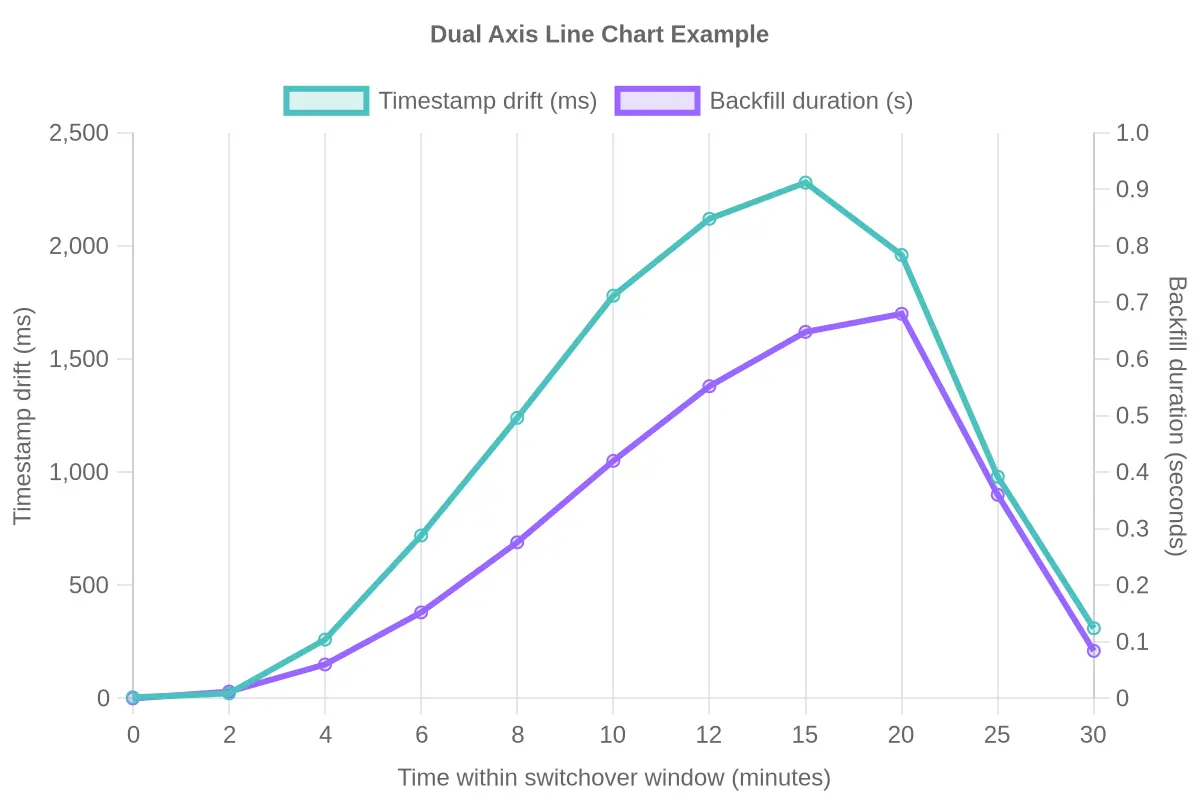
How to read it: Drift stays low for the first few minutes, then climbs steeply after the switchover at minute 4. Backfill duration follows about one interval behind, peaking near minute 15-20 before both values decay as historical data catches up. Resizing a buffer without addressing the drift ramp treats the symptom: duration here is a downstream effect of drift, not the other way around.
| Time within switchover window (min) | Timestamp drift (ms) | Backfill duration (s) |
|---|---|---|
| 0 | 5 | 0 |
| 2 | 22 | 30 |
| 4 | 260 | 150 |
| 6 | 720 | 380 |
| 8 | 1240 | 690 |
| 10 | 1780 | 1050 |
| 12 | 2120 | 1380 |
| 15 | 2280 | 1620 |
| 20 | 1960 | 1700 |
| 25 | 980 | 900 |
| 30 | 310 | 210 |
Use the table as a template when you pull logs from your own historian: line up drift samples against backfill job runtimes on the same clock. The correlation, or the lack of it, tells you whether drift correction or buffer sizing is the real bottleneck.
Buffer Size Tuning: What Actually Happens During a Controller Switchover
Two buffers stand between your process and a gap in the archive: the one on the controller and the one on the historian side. They behave differently, they fill at different rates, and they need to be sized separately.
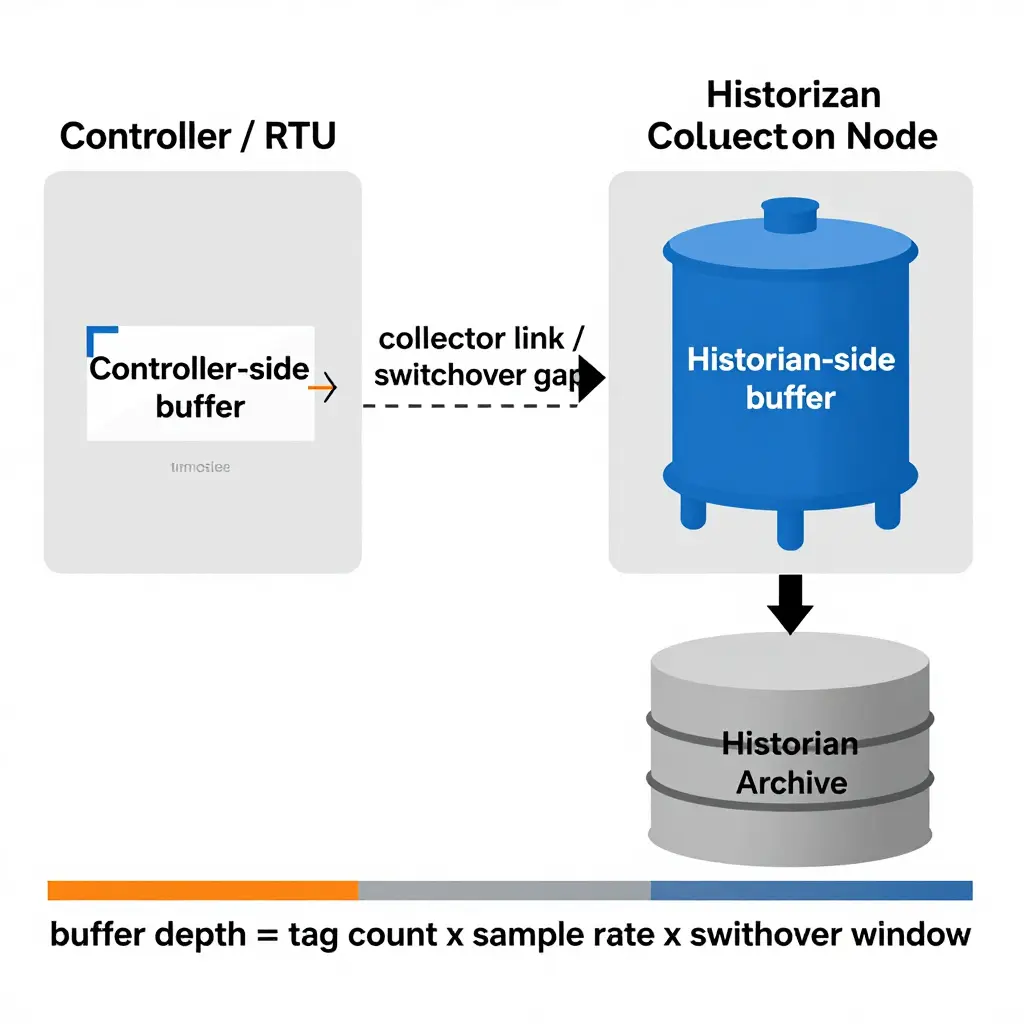
Controller-side buffers
Most PLCs, RTUs and edge gateways run a store-and-forward queue. The controller keeps sampling normally while the link to the collector is down, stamping each value with its own clock and holding those values in local memory or on an SD card. This buffer is small by design because it lives on constrained hardware.
Historian-side buffers
The collector or interface node keeps a much larger queue. It absorbs bursts, retries failed writes, and replays samples into the archive once connectivity returns. When this queue drains slowly, you get a historian backfill that can stretch for hours.
Sizing for your expected switchover window
A controller switchover is never instantaneous. Add failover time, network reconvergence, and the minutes an operator spends confirming values look sane. Then multiply.
| Element | Input | Example |
|---|---|---|
| Tags in scope | tag count | 4,000 |
| Sample rate | samples/sec/tag | 1 |
| Load | tags x rate | 4,000 samples/sec |
| Switchover window | failover + reconvergence + verification | 90 sec |
| Minimum depth | load x window | 360,000 samples |
| Recommended depth | minimum x 2 safety factor | 720,000 samples |
If your configured buffer size falls below the minimum depth, you lose data. Aim for the recommended figure.
Why a bigger buffer alone will not fix a long backfill
Engineers see a backfill that runs for hours and reach for buffer size. But timestamp drift is a different failure mode, and buffer depth does nothing to correct it.
Drift means each replayed sample carries a timestamp offset relative to the archive clock. The historian sees values that appear to belong in the past, so it must sort, reject, or overwrite out-of-order records. Replay throughput collapses not because the queue is too shallow, but because every insert costs extra time.
Increasing the buffer therefore just holds more drifted samples for longer, and the backfill still crawls. Fix the clock first: verify NTP or PTP sync on the controller and the collector, confirm both agree on time zone and DST handling, then re-measure. Buffer tuning is the second step, not the first.
Backfill Duration by Root Cause
Not every cause drags a backfill run to the multi-hour mark. The figures below are illustrative example durations, not a measured survey; they show the relative magnitude of each cause so you can judge which fixes buy back the most time.
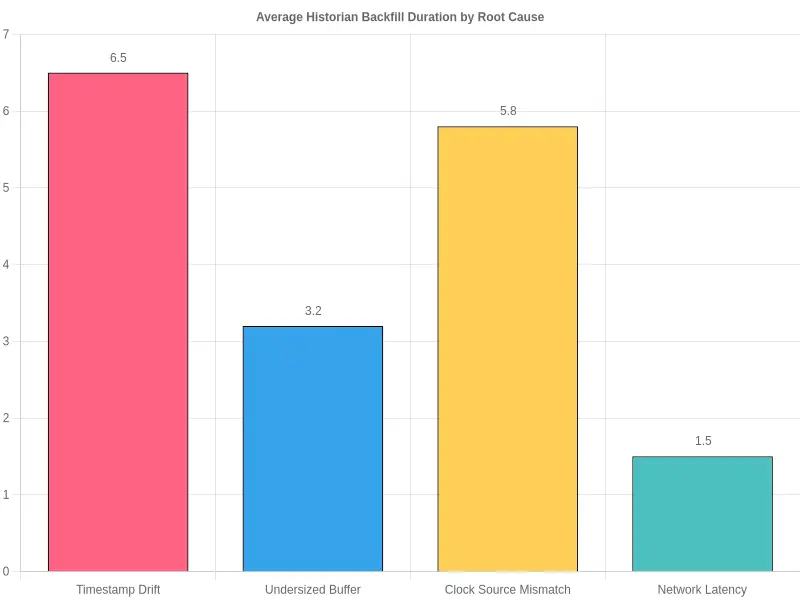
| Root Cause | Average Backfill Duration (hours) |
|---|---|
| Timestamp Drift | 6.5 |
| Clock Source Mismatch | 5.8 |
| Undersized Buffer | 3.2 |
| Network Latency | 1.5 |
The two clock-related causes sit at the top of the chart. Both inflate the gap a backfill has to replay, which is why checking timestamp drift first usually saves more time than chasing a larger buffer.
Frequently Asked Questions
Why does a historian backfill run for hours after a controller switchover?
When a controller switchover happens, the active node stops streaming live values and the standby takes over. During that handover window, samples pile up in edge buffers or gateways instead of reaching the historian in real time. The historian backfill process then replays every queued point in chronological order to close the gap. If the outage was long or your collection rate is high (think thousands of fast-changing tags), that backlog can be enormous, so replay continues for hours even after live streaming has already resumed.
How do I detect timestamp drift?
Compare source timestamps against a trusted reference clock such as NTP or PTP. Sample a few tags at known intervals and measure the delta between the source stamp and the reference stamp. A small, stable offset is normal. Timestamp drift is different: the offset grows over time, flips sign, or produces non-monotonic timestamps. Watch for suspiciously round numbers or values that freeze repeatedly – both often point to a misconfigured or dead clock source.
Does increasing buffer size fix the problem?
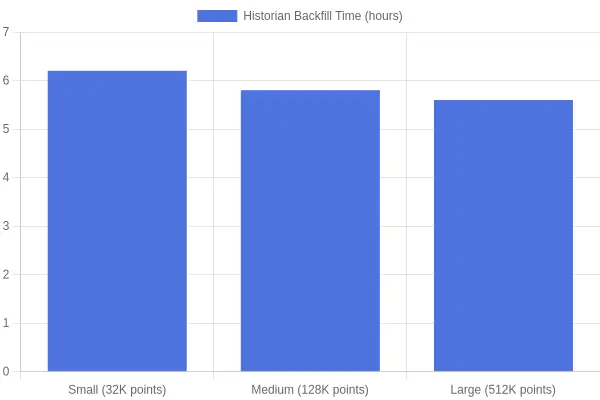
Usually not. Buffer size only controls how much data can be queued before points are dropped; it does not speed up replay or correct bad timestamps. A larger buffer can reduce data loss during a switchover, but if drift is present, the backfill stays slow and may even reorder records incorrectly. The chart below illustrates how weak a lever it is: beyond a certain depth, extra queue capacity buys back little time on a multi-hour run.
How do I align clock sources across controllers and historians?
Point every node at the same time authority: a primary NTP server or a PTP grandmaster. Configure a clear hierarchy, log step changes, and monitor offset and stratum per device. Never let local hardware clocks act as authoritative sources, and make sure historian servers, gateways, and controllers all reference the same upstream time.
Why do out-of-order values slow replay?
Historian engines are optimized for monotonic, append-only inserts. Out-of-order samples force the engine to re-sort data, locate the correct insert positions, and recompute affected aggregates. That breaks batch and bulk-write optimizations, invalidates caches, and multiplies I/O and CPU cost per point – which is why replay crawls when ordering breaks down.
How often should timestamp drift be reviewed?
Review drift after every controller switchover and after any firmware or OS update. For routine operations, check clock offset metrics weekly. In high-precision environments, monitor continuously and alert on thresholds – for example, an offset above 100 ms or an offset that keeps trending upward.
What is the right order to troubleshoot?
Fix the cause, not the symptom. Work through the checks in this order:
| Step | Check | Why it matters |
|---|---|---|
| 1 | Verify timestamps against a reference clock | Drift corrupts ordering and slows replay regardless of queue depth |
| 2 | Confirm all clock sources are aligned | Mismatched clocks recreate drift after every fix |
| 3 | Inspect replay order in logs | Reveals whether values arrive out of sequence |
| 4 | Adjust buffer size last | Only helps with data loss, not replay speed |
Start with timestamp drift, confirm your clock sources agree, and treat buffer size as the final tuning knob rather than the first thing you reach for.
Conclusion: Fix the Clock Before You Widen the Pipe
When a controller switchover triggers a historian backfill that drags on for hours, the instinct is to crank up the buffer size and hope the extra headroom absorbs the flood. Resist that urge. The real culprit is usually timestamp drift: a quiet, cumulative offset between your controllers and the historian’s clock that corrupts the ordering of records and forces the backfill engine to re-request, re-sort, and re-verify data it should have ingested once. Buffer size governs how much you can hold; timestamp drift governs whether what you hold is usable. Diagnose the clock first, and the buffer usually stops being a problem at all.
Prevention Checklist
- Monitor clock synchronization continuously across every controller, gateway, and historian node, rather than waiting for a switchover to expose a skewed source.
- Enable time-source redundancy so a single NTP server outage cannot silently push your fleet out of alignment.
- Log drift metrics over time, capturing both the offset and its rate of change, so creeping divergence shows up before it disrupts a backfill.
- Schedule routine drift reviews as a standing maintenance task, not a one-off fix after an incident.
The Takeaway
Before your next controller switchover, audit timestamp drift across all time sources, and confirm buffer size only after the clocks are verified. Fix the time, and the historian backfill completes in minutes instead of hours.