
Why Your Screen Glows but Your Vinyl Doesn’t: The Color Profile Story
You picked an orange on your laptop, approved the proof, then opened the box and it was not the orange you ordered. You are not imagining it. On custom graphics, the gap between a screen proof and the finished print shows up often, and it usually comes down to how color profiles work.
Screens Speak RGB and Emit Light
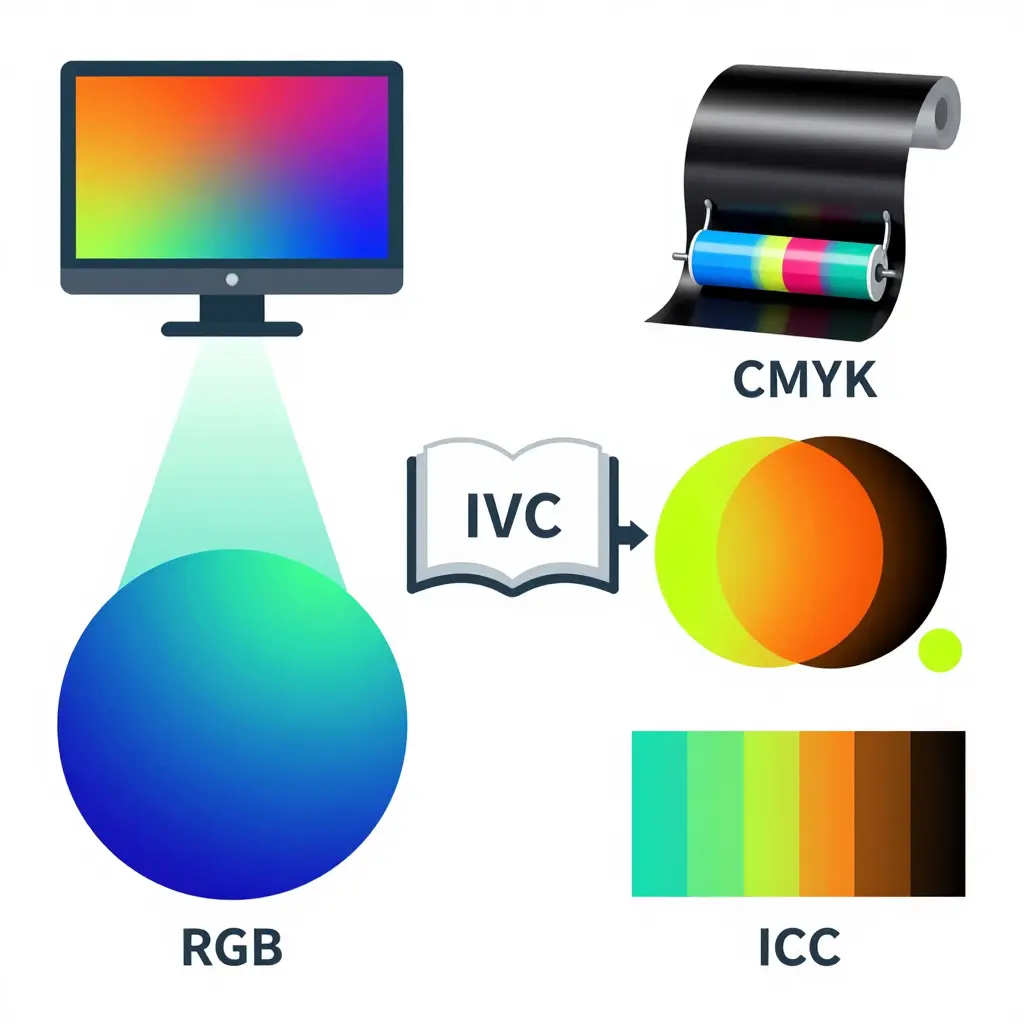
Your monitor is a light source. Each pixel is a cluster of tiny red, green, and blue emitters lit by a backlight. Because the screen gives off its own light, many modern displays reach glowing, saturated colors: bright oranges, deep greens, electric neons. That is the RGB half of RGB vs CMYK.
Vinyl Printing Speaks CMYK and Reflects Light
Printed vinyl works the other way around. The ink does not glow; it absorbs some of the light that hits it and reflects the rest back to your eyes. Most vinyl printers use CMYK – Cyan, Magenta, Yellow, and Key (black). A job may add spot inks or a laminated clear layer for protection and a little more punch, but the base process stays subtractive. That is why a printed color often looks slightly duller or shifted next to its screen twin.
The Gamut Gap: Why Neons Never Match
A gamut is the full range of colors a device can produce. RGB covers a wider range than CMYK, so vivid oranges, deep greens, and especially neons sit outside what CMYK can reach. When a color falls outside the gamut, the printer approximates it instead of reproducing it, and that approximation is the shift you see on the finished decal.
What a Color Profile (ICC Profile) Actually Does
A color profile – usually an ICC profile – is a translator. Picture a bilingual dictionary that records how one device “sees” color and maps those values into another device’s language. During color management, your design software reads the profiles and converts RGB values into the closest CMYK equivalents it can manage. It cannot invent colors a printer physically cannot make; it finds the nearest match available and can warn you when a color is out of range.
The Practical Takeaway
When a proof and a print disagree, check the color profile and the substrate first. If a neon orange or hot green matters to you, expect a slightly softer version on vinyl; that is normal, not a mistake. Designing with realistic, in-gamut colors is the fastest way to avoid surprises. Ready to build graphics that print true? Explore our custom dirt bike graphics and design with color you can trust.
Screen Proof vs. Finished Print: What Changes
The table below maps the variables that can push your on-screen proof away from the vinyl that lands on your bike. Read it top to bottom, and you’ll spot where the shift creeps in.
| Attribute | Screen Proof (RGB monitor) | Finished Print (CMYK vinyl) |
|---|---|---|
| Color space | Additive RGB; colors created by emitted light | Subtractive CMYK; colors created by reflected light and absorbed ink |
| Gamut range | Wide gamut, up to ~16.7M colors; vivid neon and pure reds easy | Narrower gamut; hot greens, deep blues, and neon oranges often out of range |
| Lighting / backlight influence | Self-lit backlight, constant brightness day or night | No backlight; appearance rises and falls with ambient light and shade |
| Substrate finish effect | None; rendered as a flat digital image | Gloss deepens contrast and darkens tones; matte mutes and softens saturation |
| Perceived brightness | High and glowing; colors feel luminous | Lower; ink absorbs light, so bright hues read slightly darker |
| Typical mismatch examples | Electric orange glows on screen; royal blue looks pure | Orange prints redder/muted; blue shifts purple; bright green dulls by 5-10% |
Quick takeaway: every mismatch usually traces back to one of two causes — a color-profile mismatch (RGB vs. CMYK) or a substrate effect (gloss, matte, and the vinyl’s own base). Lock down the profile first, then confirm how the finish will alter what the eye perceives.
Substrate and Finish: Half of the Color Equation
Here’s the part most riders overlook: the substrate is half of the color equation. The printer lays down the same ink, but how that ink reads depends on what sits beneath it and what sits on top. The same file and the same profile can look dusty and flat on one build and deep and punchy on another, because the materials differ.
Gloss vs. Matte: How Light Scatters
Matte laminate scatters light in every direction. That diffusion softens the ink, lifts the blacks toward gray, and gently desaturates color. Gloss reflects light more directly, so the ink sits “under glass”: contrast deepens and hues look richer. The gloss vs. matte choice alone can shift a print more than any profile tweak.
What’s Behind the Ink
A white base pushes vinyl toward its intended opacity and hue. Colored or metallic backing lets the surface tint or shimmer through, so translucent inks take on a different cast. On a dark base, colors lose opacity and come out muddier.
Adhesive and Film Thickness
Thicker film and heavier adhesive change how much the ink visually “floats” above the base, which shifts the tint a little. For durable, predictable results, fade-resistant vinyl decals built on a stable white base with a consistent laminate hold their color best.
Every bike platform and finish behaves a little differently, so treat the substrate as a color variable – never an afterthought.
Why Substrate and Finish Drive the Biggest Color Drift
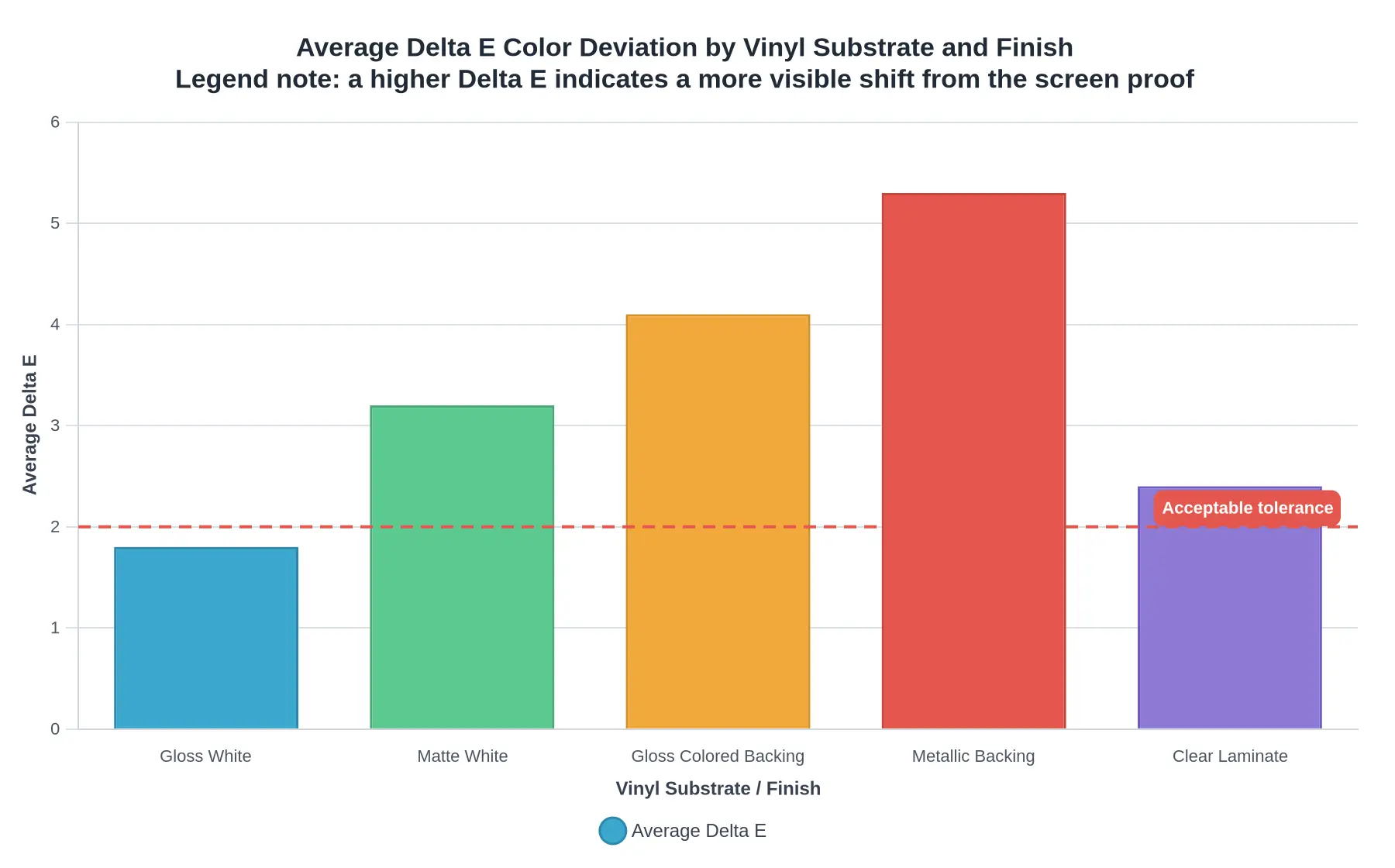
Before you blame the printer, look at what the ink is actually sitting on. The measured color deviation between a screen proof and a finished dirt bike graphic is rarely a software problem; it is almost always a substrate story. The Delta E value below quantifies that gap. The higher the number, the more visible the shift your riders and customers will notice the moment the decal hits sunlight.
Reading the Numbers
| Substrate / Finish | Avg. Delta E | Visual Shift |
|---|---|---|
| Gloss White | 1.8 | Barely perceptible |
| Clear Laminate | 2.4 | Slight, mostly in dark tones |
| Matte White | 3.2 | Noticeable on saturated reds/cyans |
| Gloss Colored Backing | 4.1 | Clearly visible dulling |
| Metallic Backing | 5.3 | Strong, high-contrast drift |
A Delta E of about 2.0 or lower is generally treated as the acceptable tolerance for production work; anything above that line is where customers start asking, “Why does my blue look purple?” Notice that the neutral Gloss White base stays comfortably inside tolerance while Metallic Backing more than doubles it. Reflective flake scatters light differently than a screen ever will, so a proof rendered on an RGB monitor cannot predict it.
What This Means in Practice
The lesson is simple: lock in your color profile and your substrate before you approve a proof. A cast vinyl with a gloss laminate behaves nothing like a calendared matte sheet, and no amount of monitor calibration will close that gap. Riders and shops working across different bike platforms should match the material to the intended look from the start. Whether you order Gloss Colored Backing or a bold Metallic finish, confirm the material spec first and the proof second.
Rule of thumb: if your Delta E lands above 2.0, adjust the substrate or finish – not just the profile – before you print.
What Causes the Screen-to-Print Color Shift
A screen proof and a finished vinyl print rarely match pixel for pixel. The difference usually comes down to a handful of predictable variables. Here are the factors that push your custom KTM graphics away from what you see on your monitor.
-
Monitor calibration and color profile mismatch – An uncalibrated display, or a proof exported in the wrong profile (sRGB vs. Adobe RGB), misrepresents hue and saturation before printing even begins. If the monitor is too bright or too warm, every color decision you make is biased from the start.
-
RGB-to-CMYK gamut limits – Screens emit light in RGB while inks absorb it in CMYK, and the CMYK gamut is noticeably smaller. Saturated neon greens, oranges, and deep blues often fall outside what ink can physically reproduce, so they get clipped or dulled.
-
Substrate base color and opacity – Ink is translucent, so the vinyl beneath it shifts the final result. A clean white base keeps colors true. A colored or opaque backing tints everything above it and darkens light tones.
-
Gloss vs. matte laminate – Gloss boosts contrast and vibrance. Matte scatters light and can mute saturation. The exact same ink reads differently under each coating.
-
Viewing light and ambient color temperature – Warm indoor bulbs, cool shade, and direct sunlight all render the same print differently, so a garage match may look off outdoors. Judge color under neutral, consistent lighting.
-
Ink curing and print density – Under-cured ink or inconsistent droplet density produces streaking, banding, and a washed-out look. Correct curing and density settings keep the output rich and repeatable.
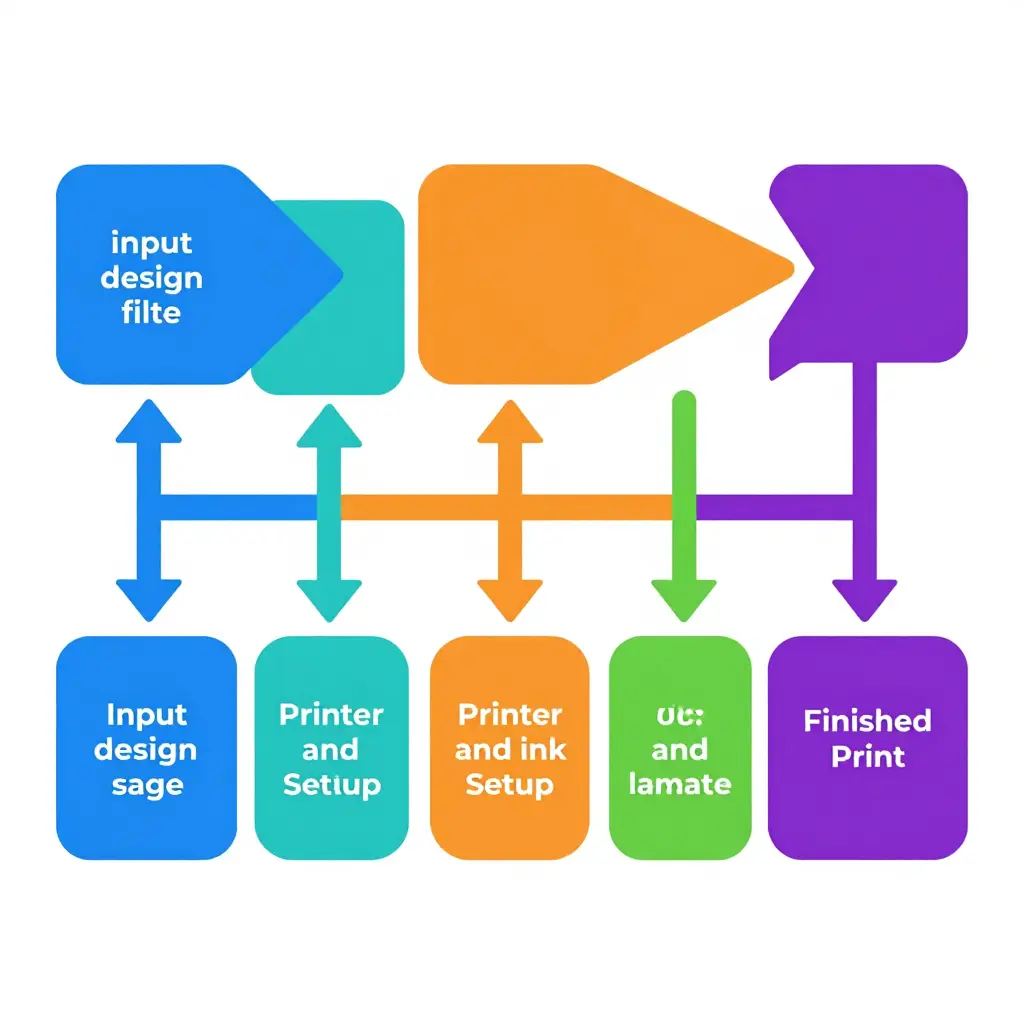
The color management path above shows why a screen proof and a finished print can drift apart. Your design starts as an RGB file, moves through an ICC profile conversion into CMYK, then passes through printer and ink setup before it meets the substrate and laminate, and finally lands as the finished print. Each arrow marks a handoff where color can shift, so check the weakest link first: the color profile and the substrate your graphics are printed on.
Check the Color Profile and Substrate Before You Order or Print
The color shift between a screen proof and the finished print almost never means the printer is “wrong.” It comes from two quiet variables: the color profile and the substrate. Get both right before money changes hands, and color accuracy stops being a gamble.
Five checks to run before you order or print
1. Exchange the correct ICC profile. A screen proof is only as trustworthy as the profile driving it. If you are a rider ordering custom KTM graphics, ask your shop which ICC profile they use and request it so you can preview on the same baseline. If you are the shop, hand it over without being asked; it removes most “that is not the color I saw” tickets before they start.
2. Soft-proof on a calibrated monitor. Start by calibrating your display, because an uncalibrated screen is fiction. Then soft-proof the file in your design software to simulate how the print will actually render. This is where you catch muddy oranges, dull reds, and crushed gradients while they are still free to fix.
3. Ask for a physical printed proof on the actual substrate. Nothing beats ink on material. Request a proof printed on the exact vinyl or film you will ship, because gloss, matte, and carbon-look substrates all shift perceived color differently. Riders: never accept a proof on office paper. Shops: make the substrate-specific proof the default, not an upsell.
4. Confirm laminate and finish. Lamination is not just protection; it changes the final sheen and can warm or cool the entire print. Lock in gloss, matte, or textured finish before approval, because a matte laminate over a saturated red can read completely differently from the glossy version you approved on screen.
5. Match Pantone/spot colors where brand accuracy matters. When sponsor or brand colors must be exact, supply the Pantone references and confirm the shop can hit them within tolerance. Process (CMYK) matching drifts from substrate to substrate; spot or Pantone-matched inks hold the line.
The result you should expect
Run these five checks and your finished graphics land where you approved them: the vivid, on-brand color you signed off on, not a washed-out approximation. You stop paying for reprints, and riders and shops stop arguing over a screen that never told the truth in the first place.
Refresh or Personalize Your Ride
Once your proof and print agree, the last step is getting those colors onto a machine that actually sits in your garage. Color lives as much on the substrate as on the screen: fade-resistant vinyl decals hold color better when the profile and the substrate are matched, so a decal tuned for glossy plastics can read differently once it lands on a matte finish. Different bikes also use different panel shapes, so start from a model-specific category rather than a generic sheet.
Riders on the 79bike platform can browse 79bike graphics shaped to those panels, while e-moto owners after an electric-specific fit will find options in the eRide graphics range. If you run a Stark Varg, the Stark Varg MXEX graphics set follows those aggressive body lines, and smaller e-moto riders can explore the ReRode R1 graphics lineup. Fans of the Arctic Leopard can personalize their machine with dedicated Arctic Leopard graphics.
Others may prefer a classic look with KTM graphics built around the brand’s familiar plastics. Surron owners are covered across the range, from Surron Light Bee graphics to the Surron Ultra Bee, and even the Surron Hyper Bee graphics for the newest frame. Talaria riders have their own home too, whether they want Talaria XXX graphics, Talaria MX3/MX4 graphics, the Talaria MX5, or the compact Talaria Komodo.
FAQ: Screen Proof vs. Finished Print Color
Why does the color look different on screen than on the printed decal?
Screens emit light, while printed decals reflect it, so the same file can look glowing and vivid on your monitor but darker and flatter once ink meets vinyl. Most monitors also display in RGB, whereas printed graphics are produced in CMYK, which covers a smaller color gamut. That gap is exactly why bright accents and deep shadows are the first things to shift between a screen proof and the finished print.
What is a color profile, and do I need one?
A color profile is a data file that tells each device – monitor, printer, or design software – how to interpret color values consistently. Without a shared color profile, your screen proof and the final print are basically speaking two different languages. If color accuracy matters to you, using calibrated ICC-based profiles on both ends is the single biggest step you can take.
Can CMYK reproduce neon or metallic colors?
Generally, no. Standard CMYK inks cannot fully reproduce fluorescent neons or true metallic finishes. Neons can be simulated with bright ink blends or spot colors, and metals require actual foils or metallic substrates rather than process printing. If those effects are essential, request a physical sample before approving the full run.
Will gloss and matte laminate change my colors?
Yes. The laminate finish has a real and measurable impact on perceived color. Gloss lamination tends to deepen blacks and boost saturation, while matte softens contrast and can make light tones look slightly muted. Judge your colors under the exact finish you plan to order, not on a bare proof.
How do I get the most accurate proof?
Start with a calibrated monitor and a proper color profile, then request a physical proof or printed sample instead of trusting your screen alone. Ask your printer which substrate and laminate the proof uses, because both change the final look. A hard-copy proof on the real material is the closest thing to a guarantee.
Does substrate base color affect the final print?
Yes. The base color and texture of the substrate, whether white, clear, metallic, or tinted vinyl, change how ink reads once printed. Printing on a clear substrate over a dark surface, for example, darkens every color compared with the same file on white vinyl. Choosing the right substrate matters as much as choosing the right ink, and comparing options like our KTM graphics line can help you plan colors around the material you will actually use.
Conclusion: The Shift Is Predictable Once You Control Two Variables
The distance between a glowing screen proof and the finished print is rarely random. It comes from two variables you can manage: the color profile and the substrate. Get those right, and the “surprise” of duller, warmer, or shifted ink mostly disappears.
Your monitor and your printer speak different color languages. A color profile is the translator. When the translation is accurate and you account for how the substrate – the vinyl, its texture, its finish – absorbs and reflects ink, color accuracy becomes an engineering problem with a known solution instead of a guessing game.
The evidence, condensed
- Color profiles define the boundaries of what each device can reproduce.
- Gamut limits explain why some vivid on-screen hues simply cannot exist in ink.
- Substrate and finish change how those inks look once applied and cured.
- A screen proof is only a simulation; the finished print is the reality.
Quick actionable recap
- Confirm the color profile before you approve any artwork.
- Match the proof to the exact substrate and laminate finish.
- Request a physical swatch for your most critical brand colors.
- Judge proofs on a calibrated monitor, not a phone in bright sunlight.
Build this two-step check – profile first, substrate second – into every order, and color stops being a risk and becomes routine. You can explore ready-to-print custom dirt bike graphics built around these standards.
As substrate technology and profile standards keep maturing, riders and print shops that treat color profile and substrate as fixed checkpoints will keep delivering consistent, fade-resistant custom dirt bike graphics season after season.