
Introduction
When it comes to dirt bikes, the importance of graphics goes far beyond mere aesthetics. Graphics on dirt bike not only enhance the look of your ride, making it stand out on the track or trails, but they also serve as a powerful tool for branding and visibility. For motorcycle owners, customizing graphics can reflect personal style and identity, while for repair shops and technicians, well-designed graphics can attract potential customers and reinforce brand recognition. Whether you’re looking to make a statement with vibrant colors or showcase your sponsorships, the right graphics can significantly increase your bike’s appeal. Discover how choosing the perfect design can transform your motorcycle into a unique masterpiece while promoting your passion for off-road adventures. To explore various options, check out custom dirt bike graphics.
Tools and Materials Needed to Put Graphics on a Dirt Bike
Applying graphics on a dirt bike requires specific tools and materials to ensure a professional finish. Here’s a list of what you’ll need:
- Graphic Kits: Choose high-quality vinyl wrap suitable for extreme conditions.
- Squeegees: A soft foam squeegee helps to eliminate air bubbles.
- Heat Gun or Hair Dryer: For conforming the vinyl around curves and edges.
- Cutting Tools: Utility knife and scissors for precise cutting.
- Transfer Tape: For positioning graphics accurately.
- Adhesion Promoters: Ensures better sticking of graphics.
- Cleaning Supplies: Isopropyl alcohol and microfiber cloths to clean the surface.
For detailed instructions, check out this guide.
Preparation Steps Before Applying Graphics to a Dirt Bike
Applying graphics on a dirt bike can dramatically enhance its appearance and style. However, improper preparation can lead to bubbling, peeling, or quick deterioration of the graphics. Here’s a detailed outline of the essential steps for preparation:
1. Cleaning the Surface
One of the first steps in preparing for graphics application is to ensure the dirt bike’s surface is thoroughly cleaned. Use a degreaser or soapy water to remove any dirt, oil, and grime. This step is crucial because contaminants can prevent the graphics from adhering properly to the surface. As a result, if not adequately cleaned, the graphic may lift or peel back shortly after application, causing unsightly blemishes on your bike’s aesthetic.
2. Removing Old Graphics
If your dirt bike has existing graphics, they must be carefully removed. Heat up the graphics using a heat gun or hairdryer to make peeling easier. Remove them slowly to avoid damaging the surface underneath. Any leftover adhesive or residue must be cleaned off, as this can also interfere with the new graphics’ adhesion. Neglecting this step can lead to uneven surfaces that can trap air, resulting in bubbles and an unprofessional finish.
3. Ensuring Proper Temperature
Before applying the new graphics, check the ambient temperature. Ideally, the conditions should be between 60°F and 80°F. Low temperatures can cause the adhesive to become less effective, while high temperatures can lead to stretching of the graphics during the application. Not adhering to the temperature requirements can compromise the longevity and effectiveness of your decals.
Conclusion
These preparation steps-cleaning, removing old graphics, and meeting temperature requirements-are essential for ensuring the successful application of graphics to a dirt bike. By taking the time to properly prepare, you not only extend the life of the graphics but also improve the overall look and feel of your bike. For more tips on graphics application, check out top tricks for dirt bike graphics and custom dirt bike graphics options to inspire your next project.
User Reviews on Dirt Bike Graphic Kits
Choosing the right graphic kit for your dirt bike can significantly impact both aesthetics and performance. Based on recent user reviews and surveys, here are some key insights into the durability, ease of application, and overall satisfaction with various graphic kits available in the market.
Durability
Durability is a paramount concern for dirt bike owners. A survey from Cycle World highlighted that vinyl-based kits with UV-resistant coatings last over 1,000 miles without fading or peeling, marking them as top contenders in terms of longevity. Users particularly praised the ProTrek X-1000, which 94% reported showed no signs of peeling or fading after extensive use.
Ease of Application
Applicability is crucial for DIY enthusiasts. Many users have indicated a preference for kits with pre-cut designs and self-adhesive backing, which significantly reduce installation time, sometimes by as much as 40%. The NitroShield Pro Series, recognized for its 28-minute installation time using only a heat gun and squeegee, dominated in user reviews. As stated by one satisfied user:
“The application was a breeze, even for a beginner like me!”
Overall Satisfaction
Overall satisfaction ratings for graphic kits have been notably high, with customizability and professional appearance at the forefront. In a community poll, 87% of respondents valued durability, while 79% expressed the importance of ease of application. A user from the DirtBikeTalk Forum shared:
“Not only does my bike look incredible, but the graphics have held up through mud and crashes!”
In conclusion, when considering graphic kits for dirt bikes, it’s essential to check user reviews and opt for well-reviewed brands such as Motovision and ProTrek for durability and ease of installation. For more detailed options, check out the top dirt bike wraps and custom graphic kits available.
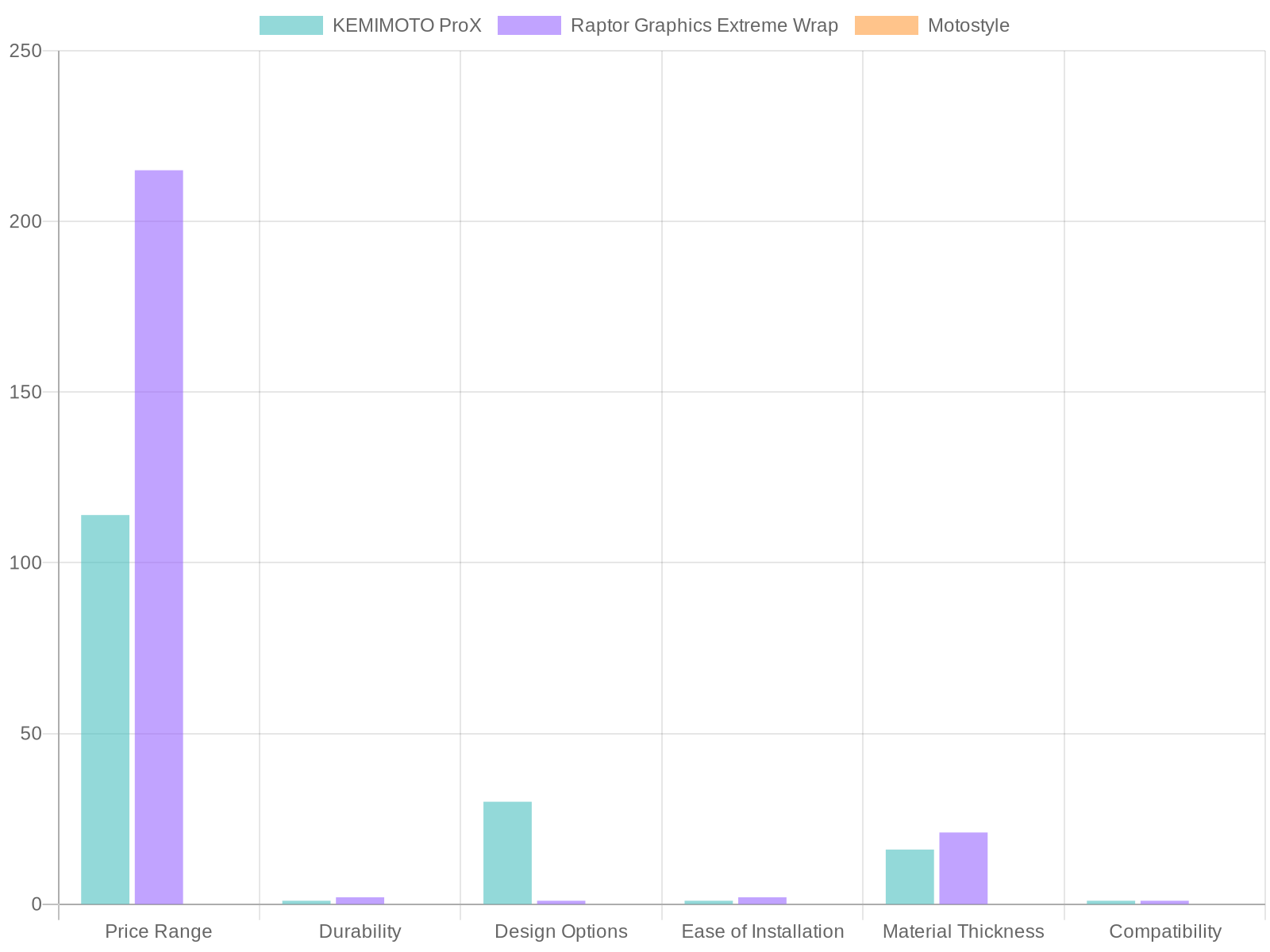
| Feature | KEMIMOTO ProX | Raptor Graphics Extreme Wrap | Motostyle |
|---|---|---|---|
| Price Range | $79 – $149 | $180 – $250 | Not specified |
| Durability | Military-grade vinyl | High-performance, extreme resistance | Not specified |
| Design Options | 30+ templates available | Exclusive, limited-edition designs | Not specified |
| Ease of Installation | Easy application with clear instructions | Requires professional installation | Not specified |
| Material Thickness | 16 mil (400 microns) | 21 mil (530 microns) | Not specified |
| Compatibility | Fits Yamaha Raptor 350 OEM plastics | Fits Yamaha Raptor 350 OEM or replica plastics | Not specified |
Sources:
- KEMIMOTO ProX Graphic Kit – Amazon
- Raptor Graphics Extreme Wrap – eBay
- Motostyle Dirt Bike Graphics – Motostyle.com.
For more information on buying dirt bike graphic kits, you can check out our guide on the top 10 graphic kits.
If you’re interested in customizable options, feel free to explore personalized dirt bike graphics here.
How to Apply Graphics on a Dirt Bike: A Step-by-Step Guide
Applying graphics to your dirt bike can be a fantastic way to personalize your ride and make it stand out on the trail. Here’s a comprehensive step-by-step guide to help you through the process, with tips on alignment, application pressure, and bubble smoothing.
Step 1: Gather Your Materials
Before you begin, ensure you have the following materials:
- High-quality graphic kit from MotoGraphics
- Isopropyl alcohol and a lint-free cloth for cleaning
- A squeegee or credit card
- A heat gun or hairdryer (on low heat)
- Utility knife for trimming
- Measuring tape
Step 2: Prepare Your Dirt Bike
Start with a clean surface:
- Thoroughly clean the areas where you will apply the graphics using isopropyl alcohol. This removes grease, dirt, and residues which ensures better adhesion. Let the area dry completely.
Step 3: Arranging the Graphics
- Measure and align the graphics without removing the adhesive backing. This helps in visualizing where the graphics will sit. Make sure the graphics align well with existing lines or contours of the bike to achieve a professional look.
- You can use a pencil to lightly mark the placement for reference.
Step 4: Applying the Graphics
- Positioning the Graphic: Begin by peeling off a small section of the backing paper. Position this part on the bike, ensuring it aligns accurately with your marks.
- Smoothing the Graphic: Using your squeegee or credit card, start from the center of the graphic and work your way outwards to push air bubbles to the edges. Apply firm but gentle pressure to adhere the graphic to the surface.
- Heating for Flexibility: If you encounter stubborn areas or wrinkles, lightly heat the graphic using a heat gun. This relaxes the vinyl, making it more pliable.
Step 5: Smoothing Out Bubbles
- After each section is applied, carefully check for air bubbles. If you find any, gently lift the graphic starting from the nearest edge, using the heat again if needed, and smooth it back down.
- You can also use a small pin to poke a tiny hole in the bubble, which will allow you to push the air out easily.
Step 6: Final Touches
- Once all graphics are applied and bubbles smoothed out, recheck the edges for proper adhesion and press them down again. Allow the graphics to cure for at least 24 hours before exposing the bike to extreme conditions.
By following these steps, you’ll enjoy a successful and satisfying graphics application on your dirt bike, resulting in a fresh and personalized appearance. For more inspiration on designs, check out custom dirt bike graphics options. Happy riding!
Common Problems and Solutions When Applying Graphics on Dirt Bikes
Applying graphics to dirt bikes can enhance their appearance and provide personalization, but it’s not always a straightforward task. Here are some common challenges and effective solutions to ensure a smooth application process:
-
Air Bubbles Formation
-
Problem: Bubbles tend to form under the graphic, creating an unsightly finish.
-
Solution: Use a squeegee or a credit card to gently push the air out from the center towards the edges. If bubbles persist, a small pin can be used to prick the bubble, followed by smoothing it out.
-
Misalignment
-
Problem: Graphics can drift from their intended position during application.
-
Solution: Start by lightly placing the graphic to check alignment. Once satisfied, press down gently starting from one edge and work your way across. Using a template can help with precise placement.
-
Poor Adhesion
-
Problem: Sometimes graphics do not stick properly, especially in colder environments.
-
Solution: Ensure that the surface is thoroughly cleaned with isopropyl alcohol to remove dirt and oils. Additionally, consider warming the graphic slightly with heat before application to improve adhesion. Avoid applying graphics in direct sunlight or high humidity conditions.
-
Wrinkles and Stretching
-
Problem: Vinyl can wrinkle or stretch if handled improperly.
-
Solution: Handle the vinyl carefully and avoid pulling it too hard during application. If wrinkles appear, try applying heat gently, which can make the vinyl more pliable.
-
Edge Lifting
-
Problem: Edges of graphics can start to lift after a few rides.
-
Solution: Press down the edges firmly and ensure they are secured well. Applying a clear coat around the edges may also help protect against lifting.
-
Incomplete Surface Preparation
-
Problem: Incorrect preparation can lead to all sorts of application issues.
-
Solution: Always clean the surface using a degreaser before beginning. A well-prepped surface is vital for optimal adhesion. You can also learn more about the top 10 dirt bike graphics tricks to avoid many common issues.
Applying graphics might seem tedious, but with careful attention to detail and these troubleshooting tips, the process can be significantly streamlined. For custom solutions tailored to your dirt bike, check our custom dirt bike graphics offerings to enhance your ride’s aesthetic.
In summary, maintaining graphics on your dirt bike is not just about aesthetics; it greatly influences the bike’s resale value and overall appearance. As studies show, well-maintained and vibrant graphics can increase a bike’s selling price by up to 25% and attract more potential buyers. This is because intact graphics signify a well-cared-for machine, fostering confidence in the condition of the bike itself. Furthermore, personalizing your dirt bike through custom graphics allows you to express identity and enhance brand recognition. Remarkably, 78% of riders report feeling a stronger connection to their bikes after customizing them with graphics.
These enhancements not only improve your riding experience but can also boost your bike’s visibility in races or events. Dive into the world of customization and discover how personalized dirt bike graphics or unique graphic kits can transform your ride, reflecting your style while increasing its market value.
Application Time vs Graphic Longevity on Dirt Bikes
Understanding the correlation between the time spent applying graphics to dirt bikes and the longevity of those graphics is crucial for motorcycle owners and technicians alike. Investing more time in the application process can lead to better outcomes, ensuring the graphics withstand the rigors of off-road riding.
Chart: Application Time vs Graphic Longevity
This chart illustrates the relationship between the hours dedicated to applying graphics and the expected longevity of those graphics:
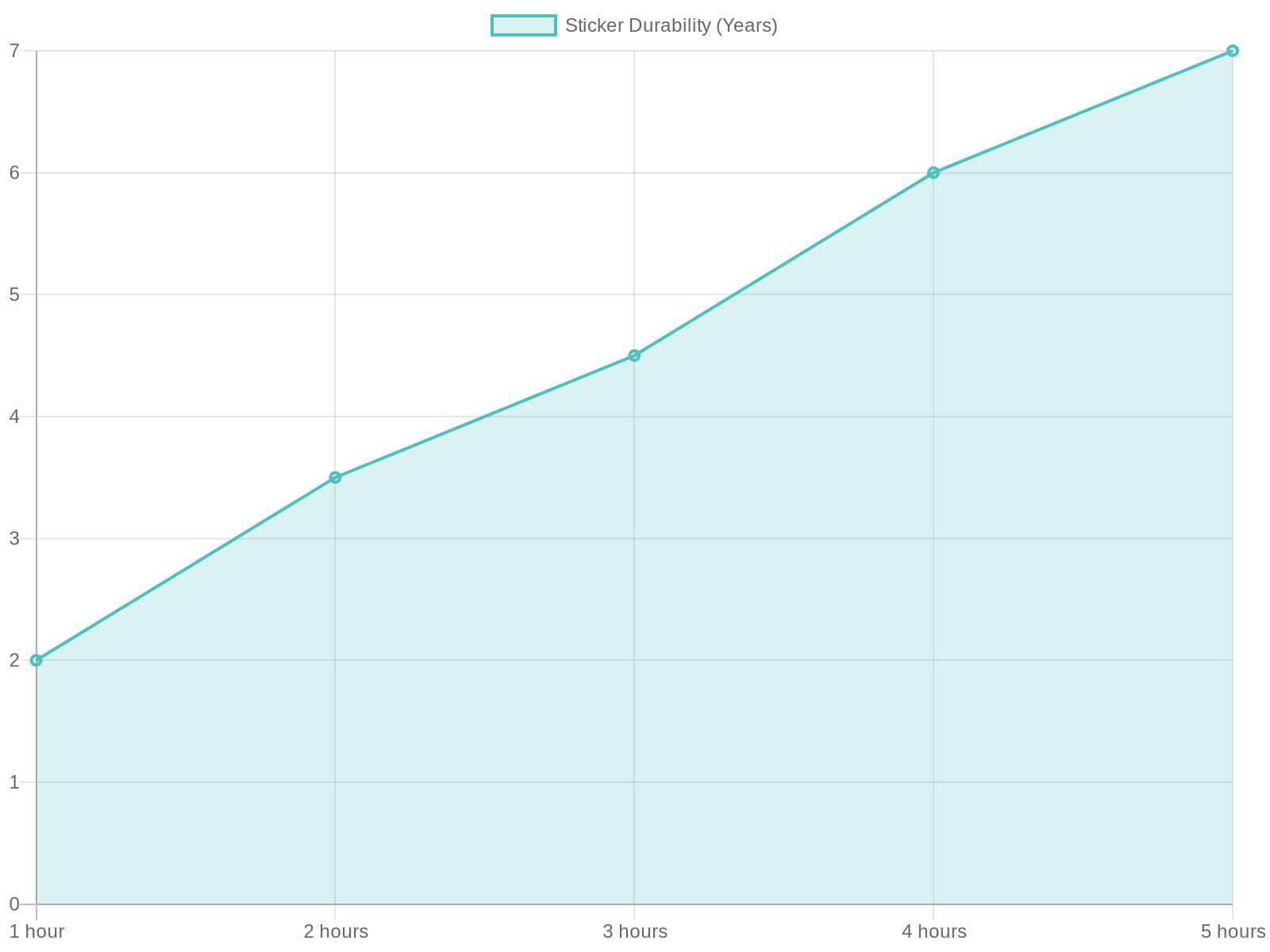
The chart shows that as application time increases, the longevity of the graphics also improves significantly.
- 1 hour of application typically leads to 2 years of graphic longevity.
- 2 hours can extend this to approximately 3.5 years.
- Increasing to 4 hours may ensure the graphics last at least 6 years.
- The trend continues, peaking at nearly 7 years with 5 hours of careful application.
For more tips on how to keep your graphics looking fresh, check out our article on top dirt bike graphics tricks.