
Custom Dirt Bike Graphic Kits Crease at the Tank Shroud Gap – Here Is the Fix
Custom dirt bike graphic kits crease at the tank shroud gap when the fuel tank swells. Heat, squeegee pressure and extra adhesive will not stop it. The vinyl has nowhere left to go, and the fault sits in the artwork, not in the install.
The folds show on the shroud itself, along the rear inner edge where the panel meets the tank cover. They usually start a few centimetres above the lower mounting bolt and creep upward as the tank grows. The gap closes, the vinyl bunches instead of stretching, and the graphic lifts along the fold until the edge peels.
The fix is a relief cut: a short, deliberate slit or notch drawn into the artwork at the point of compression, added before the kit is reprinted. What follows covers placement measurements, cut length and direction, hiding the cut inside the design, and carrying the change into the production file. The same approach applies whether you run one of our KTM graphic kits or print your own line.
Why the Tank Shroud Gap Is a Crease Magnet
The tank shroud gap is the recessed channel where the edge of one plastic panel meets the next, and the vinyl crosses it as an unsupported bridge. On both sides of the channel the film is bonded flat to rigid plastic. That makes the gap the only place in the assembly where the material can move, and it is where almost every swollen-tank crease begins.
Pressure-Sensitive Vinyl Is a Poor Shock Absorber
Cast pressure-sensitive vinyl is viscoelastic. Warm it and load it slowly, and it elongates; load it in plane, especially quickly, and it barely gives. The adhesive holds through surface wet-out and shear strength, so once the bond cures the film stops sliding over the plastic underneath. What is left is a thin, semi-rigid membrane pinned at two fixed points.
Tank Swell Closes the Gap and Shortens the Path
Fuel absorption and heat make the polyethylene tank swell, and the swelling pushes the shroud outward. The channel between shroud edge and tank cover narrows, and its two edges tilt as they come together, so the path the film has to cover gets shorter than the length it was printed at.
Adhesion Pins the Film, So the Load Has Nowhere to Go
Adhesion on both sides of the gap fixes the film’s endpoints, so the shortened path arrives as compressive load along the unsupported bridge. The material cannot slide or shrink, and it will not stretch under compression. The only freedom left is out-of-plane buckling: the film pops up and folds at the shortest wavelength available, which is why the crease is a tight ridge inside the channel rather than a gentle ripple.
One Fold, Then Permanent Memory
That buckle does not reverse. Once the vinyl yields into a fold, the adhesive under the ridge loses contact, the polymer takes a set, and the crease stays after the tank returns to size. The chain, link by link:
| Driver | Mechanical effect | Result at the gap |
|---|---|---|
| Tank swell | Tank pushes the shroud outward | Gap between shroud and tank cover closes |
| Tilting gap edges | Edges rotate as they come together | Path between anchors shortens |
| Adhesion on both sides | Endpoints are fixed in shear | No relief or slip is possible |
| Compressive load | Film must shorten in plane | Out-of-plane buckling |
| Vinyl yield | Local fold forms, adhesive lifts | Permanent crease in the vinyl graphics |
A continuous film pinned across a gap that closes will always fold. Relief cuts work because they break the load path into short segments, so the film closes up a little at each cut instead of buckling as one membrane. Add them before the reprint, and the same swelling motion closes a few hidden slits instead of raising a visible crease across the tank shroud gap.
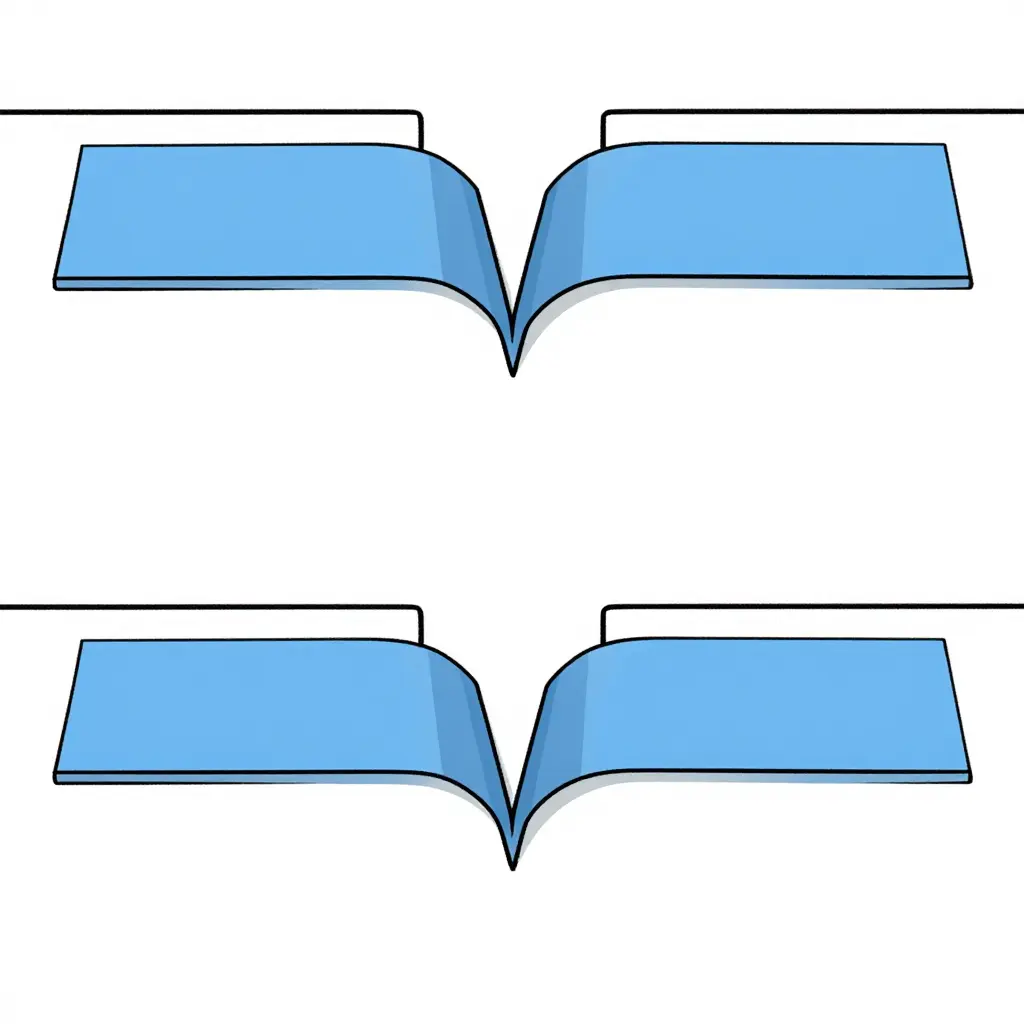
Left: an uncut film spans the shroud gap and is forced into one sharp fold. Right: a narrow V-shaped relief cut divides that span into short segments, so the film lies flat – the difference you feel with your thumb before you ever see it.
Crease Symptoms and Diagnostic Checks
Run these checks before you burn another set of vinyl. Each one points to movement at the shroud rather than to your technique.
- Fold origin: the crease starts at the edge of the tank shroud gap and its apex points into that gap; it never sits mid-panel on a flat area.
- Crease direction: the line runs roughly perpendicular to the shroud edge and radiates outward from the gap instead of tracing the path your squeegee travelled.
- Repeatability: lift the piece, clean the surface, re-apply it dry, and the same fold reappears in the same location within minutes.
- Heat response: warming the vinyl to roughly 40-50 C (104-122 F) relaxes the crease, but it creeps back as the film cools and the tank settles.
- Load test: with the tank empty and the shroud bolts loosened the vinyl sits flat, then the fold returns as soon as the shroud is torqued back down.
- Timing: the crease only shows after the bike sits in the sun or comes back from a ride, never on a cold, freshly installed panel.
- Adhesion check: peel back along the crease and the adhesive is fully bonded, with no dust lines, fisheye or dry patches – the mess sloppy prep usually leaves behind.
- Same-technique control: neighbouring panels laid with an identical squeegee pass, pressure and overlap stay flat, so application technique is not the variable.
- Kit comparison: stock and custom graphic kits both crease at the gap until relief cuts are added, whether you run KTM graphics or another brand’s set.
Together these rule out poor surface prep and a bad squeegee pass. What is left is tank swell at the tank shroud gap.
Relief Cut Placement by Shroud and Tank Type
Use these as starting specs for cut quantity, orientation and depth. All widths and depths are in millimetres and measured on the installed shroud with the tank at riding volume.
| Shroud or Gap Type | Typical Gap Width | Recommended Cut Quantity | Cut Orientation & Depth |
|---|---|---|---|
| Narrow gap, tight OEM shroud | 2-4 mm | 1 per side | Vertical; 6-8 mm deep |
| Standard OEM gap | 4-8 mm | 2 per side | Vertical; 8-10 mm deep |
| Wide gap, aftermarket shroud | 8-15 mm | 3 per side | Vertical; 10-12 mm deep |
| Overlapping shroud (shroud over tank) | 0-2 mm | 2-3 per side | Diagonal 30-45 deg; 8-10 mm deep |
| One-piece graphic kit | 4-10 mm | 2 per panel | Vertical; 8-10 mm deep, both sides of gap |
| Multi-piece graphic kit | 4-10 mm | 1 per panel edge | Vertical; 6-8 mm deep, clear of overlap seam |
Note: Treat every value above as a starting point, because tank swell, shroud part number and vinyl thickness all shift the real gap. Confirm cut count and depth on the actual part with a dry fit, then adjust before you commit the reprint on your MX graphics kit.
Measurement and Layout Method for Placing Relief Cuts
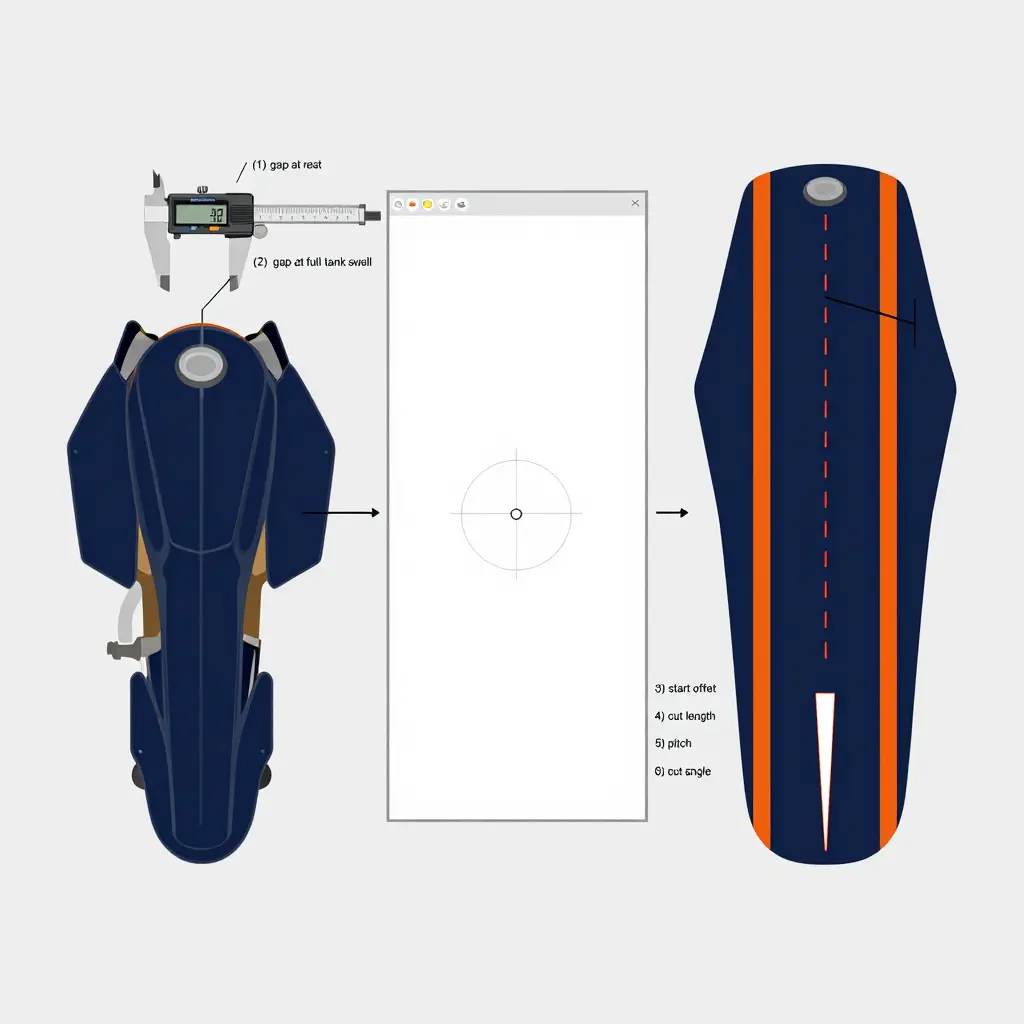
Measure the bike, never the installed film. Park the machine level with the plastics fitted and the seat in place, then take the tank shroud gap at three stations along the seam – upper shoulder, mid-shroud and lower fixing – using a feeler gauge or the depth blade of a digital caliper. Record the first reading with the tank empty and settled; that is geometry parameter 1, the tank shroud gap at rest. Fill the tank, let the plastic relax for a few minutes, and repeat the same three-station sweep for parameter 2, the gap at full tank swell. The difference between the two readings is your compression allowance, and it is that number, not an eyeballed gap, that drives every cut you lay out.
Transfer the readings onto the flat artwork file before you approve the reprint, never onto film that is already stuck to the shroud. Open the print file at 1:1, register it against the same datum you used on the bike – bolt-hole centres plus the shroud’s outer edge – and plot each station as parameter 3, the cut start offset from the panel datum, measured along the seam line. From each start point, draw parameter 4, the relief cut length, as the compression allowance plus two millimetres of margin, so the slit has room to close without the flanks riding over each other; then set parameter 5, the relief cut pitch, at 25-40 mm, tightening the spacing wherever the shroud curve is sharpest. Every kit in our KTM graphics range is supplied as a flat print file, so the datum marks and outline strokes are already there to snap to.
Cut orientation follows the direction the panel moves, not the shape of the gap. Where tank swell pushes the shroud sideways, hold parameter 6, the cut angle, at 90 degrees to that axis within 10 degrees, so each slit closes flat as the panel comes in instead of puckering into a hard crease. Finally, snap every cut onto an existing design line – a black outline, a pinstripe, a panel break – and keep slits clear of numbers, logos and rider names, so the finished graphic still reads correctly once the cuts close under load.
| No. | Geometry parameter | Established on | Working value |
|---|---|---|---|
| 1 | Tank shroud gap at rest | Bike, feeler gauge or caliper, 3 stations | As found, typically 5-8 mm |
| 2 | Tank shroud gap at full tank swell | Bike, tank filled and settled | As found, typically 2-4 mm |
| 3 | Cut start offset from panel datum | Flat artwork file at 1:1 | 3 mm inside the seam line |
| 4 | Relief cut length | Flat artwork file | Parameters 1 minus 2, plus 2 mm margin |
| 5 | Relief cut pitch | Flat artwork file | 25-40 mm, tighter on sharp curves |
| 6 | Cut angle to compression axis | Flat artwork file | 90 degrees, plus or minus 10 degrees |
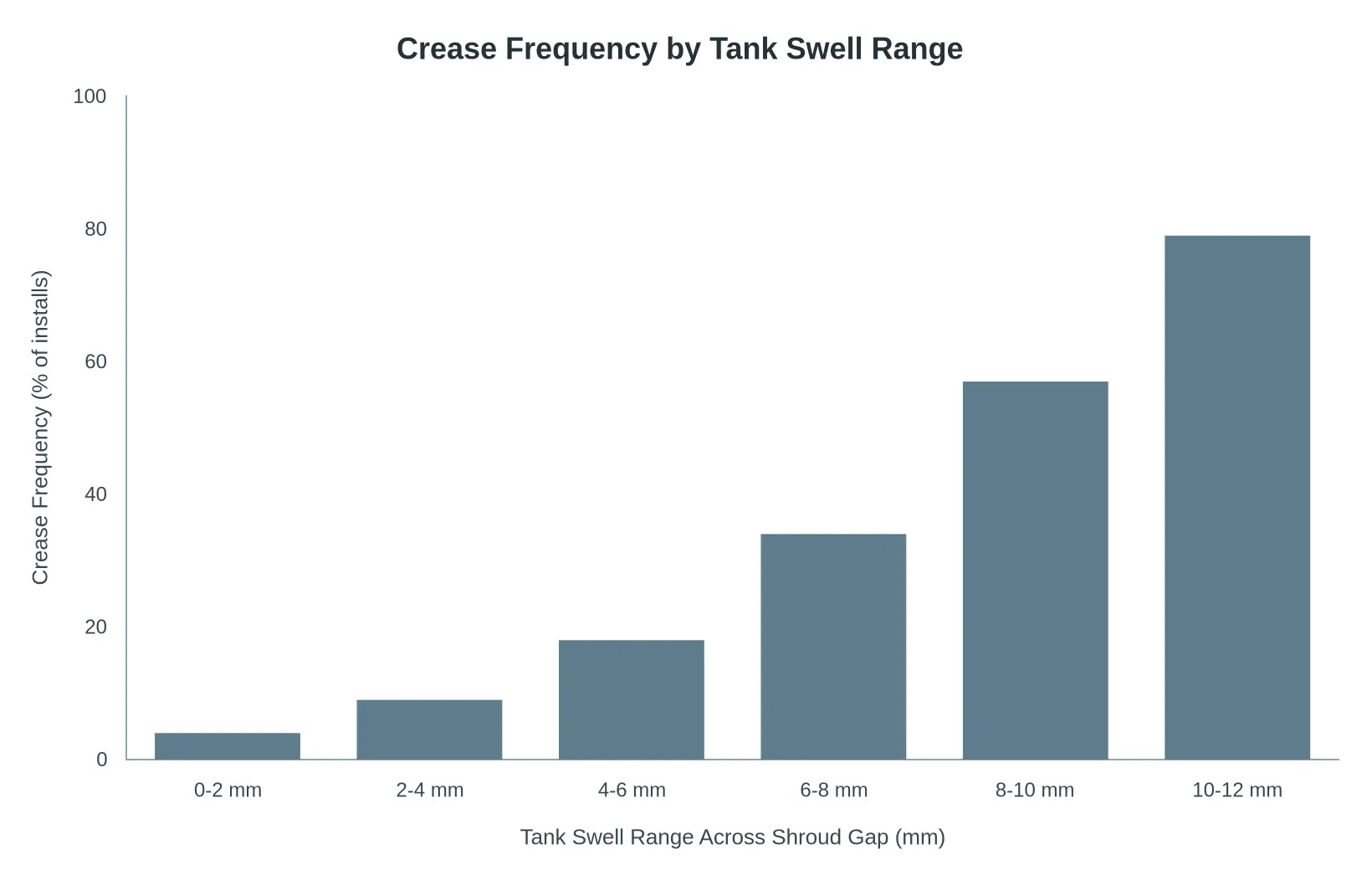
Representative sample of installs: crease frequency climbs as the tank swell range across the shroud gap increases, from roughly 4% in the 0-2 mm band to nearly 80% once swell reaches 10-12 mm.
Step-by-Step: Adding Relief Cuts Before You Reprint
When a tank swells, the vinyl on a shroud has nowhere to go, so it creases. Relief cuts give the material controlled places to close up instead of buckling across the printed area. Work the sequence in order; each step uses the measurement taken in the one before it.
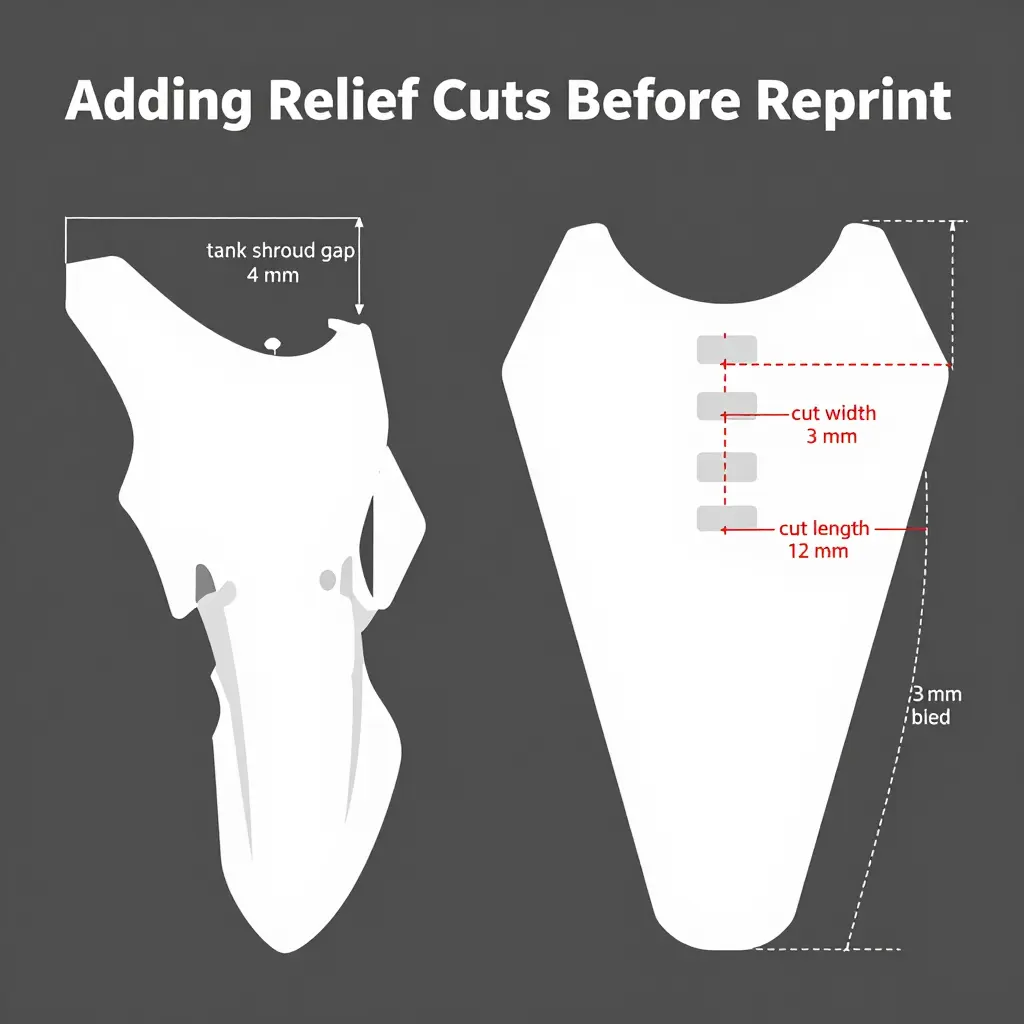
- Measure the gap at full tank swell. Fill the tank to its normal riding volume, let it sit, then measure the widest point of the tank shroud gap with a set of calipers and record the number in millimetres. Repeat the measurement on both sides of the bike so the corrected file accounts for asymmetry.
- Mark cut positions in the design file. Open the artwork in your vector editor and place three to five relief cuts along the curve of the shroud edge, spacing them evenly and keeping every cut outside the main logo and number plate area. Save this as a new revision so the original custom dirt bike graphic kits file stays intact.
- Set the cut width and length. Size each cut to roughly one-third of the measured gap in width and two to three times that width in length, which is enough to close under strain without exposing bare plastic. Convert the cuts to a dedicated spot colour on their own layer so the cutter can be driven independently of the print.
- Align the cuts with the design. Overlay the cut layer on the artwork at 100% zoom and confirm that each relief cut follows the contour of the shroud fold rather than running square to the panel edge. Nudge the cuts until they sit parallel to the crease line, then lock the layer.
- Adjust for bleed and overlap. Extend the graphic artwork 3 mm past the trim line and pull each cut back from the panel edge by at least 2 mm to protect the overlap zone. Verify that no cut crosses a bleed edge, which would let the material lift during installation.
- Produce a test print and test cut. Run one full-colour print on the same cast vinyl and laminate you will use for production, cut the relief slits by hand or on the plotter, and label it as a test. Compare the slit width against your cut width setting before you commit to the reprint run.
- Check the fit on the shroud. Install the test piece on the bike with the tank at riding volume and press the vinyl into the tank shroud gap with a squeegee. Look for any pinch, silvering or new crease, and widen the relief cuts slightly if the material still fights the panel.
- Confirm the corrected file and release it. Record the final cut widths, lengths and positions on the revision notes, then approve the file for the production reprint. Send the locked artwork to the printer with the cut layer enabled and archive the signed-off version for future runs of the same KTM graphics kit.
The order matters: measurement sets the cut geometry, the cut geometry sets the test print, and only a passing fit test earns a production release. Skip the fit check and you reprint the same crease twice.
Reading the Relief Cut Schematic
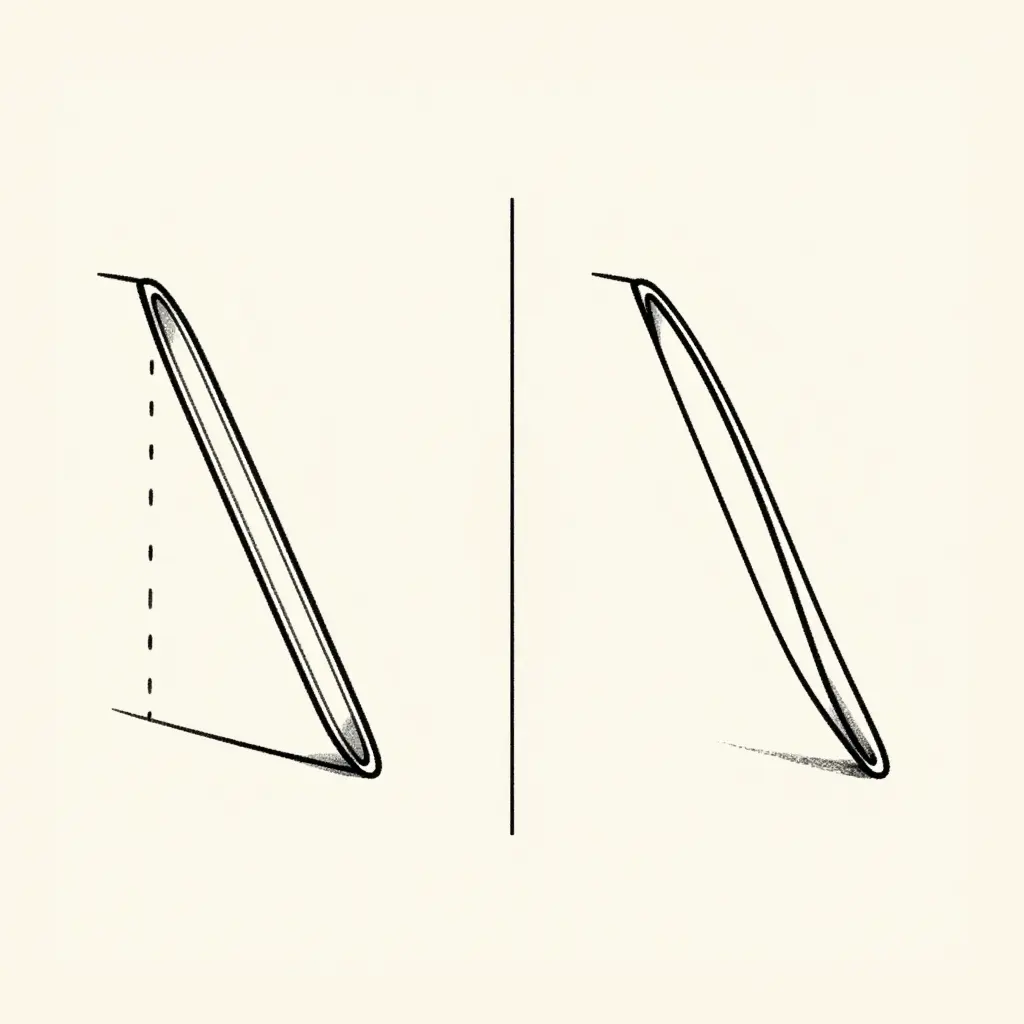
The schematic carries the whole idea: a single narrow notch, cut before the vinyl ever touches the shroud, can save you a full reprint.
Left: the straight notch
The straight cut is the workhorse. Two nearly parallel lines run inward from the free edge of the panel, holding a slim, constant width so the slot does not wander or tear when the tank swells against it. A small arc at the mouth records the included angle, open enough that the two flanks never pinch as they close, tight enough that the notch still reads as a hairline after install. The tip is blunt and rounded rather than pointed, because a sharp point is a stress riser that turns a relief cut into a crack starter. Then look at where the tip lands: short of the dashed contour. That contour marks the high-stress area around the shroud gap, and the whole job of the notch is to end before it gets there.
Right: the curved notch
The curved version follows identical rules with one change: the slot arcs gently sideways to track a curved panel edge or a contour line already present in the graphic. Width stays slim, the tip stays rounded, and the termination still sits clear of the high-stress zone. The curve simply buys extra clearance without lengthening the cut, which matters when the artwork leaves you very little dead space to work with.
What the drawing is telling you
Both shapes obey the same three constraints: angle open, length minimal, termination blunt and well short of the stressed area. Once that check is habit, you can judge any relief cut in seconds, whether you are trimming a fresh kit on the bench or correcting a set that already creased.
| Element | What to draw | Why it matters |
|---|---|---|
| Included angle | A small, open arc at the mouth | Too tight pinches and peels; too open stops relieving |
| Notch length | Just past the crease line | Longer than needed adds a second weak point |
| Tip shape | Rounded, blunt | Sharp points concentrate stress and start tears |
| Termination | Clear of the high-stress zone | A cut into the stressed area defeats the purpose |
| Width | Slim and constant | Wide slots show through the print |
Use the schematic as a stencil reference, not a fixed template. Scale the length to your own gap, keep the geometry honest, and you get a graphic kit that moves with the tank instead of fighting it.
Revising the Artwork and Running the Reprint
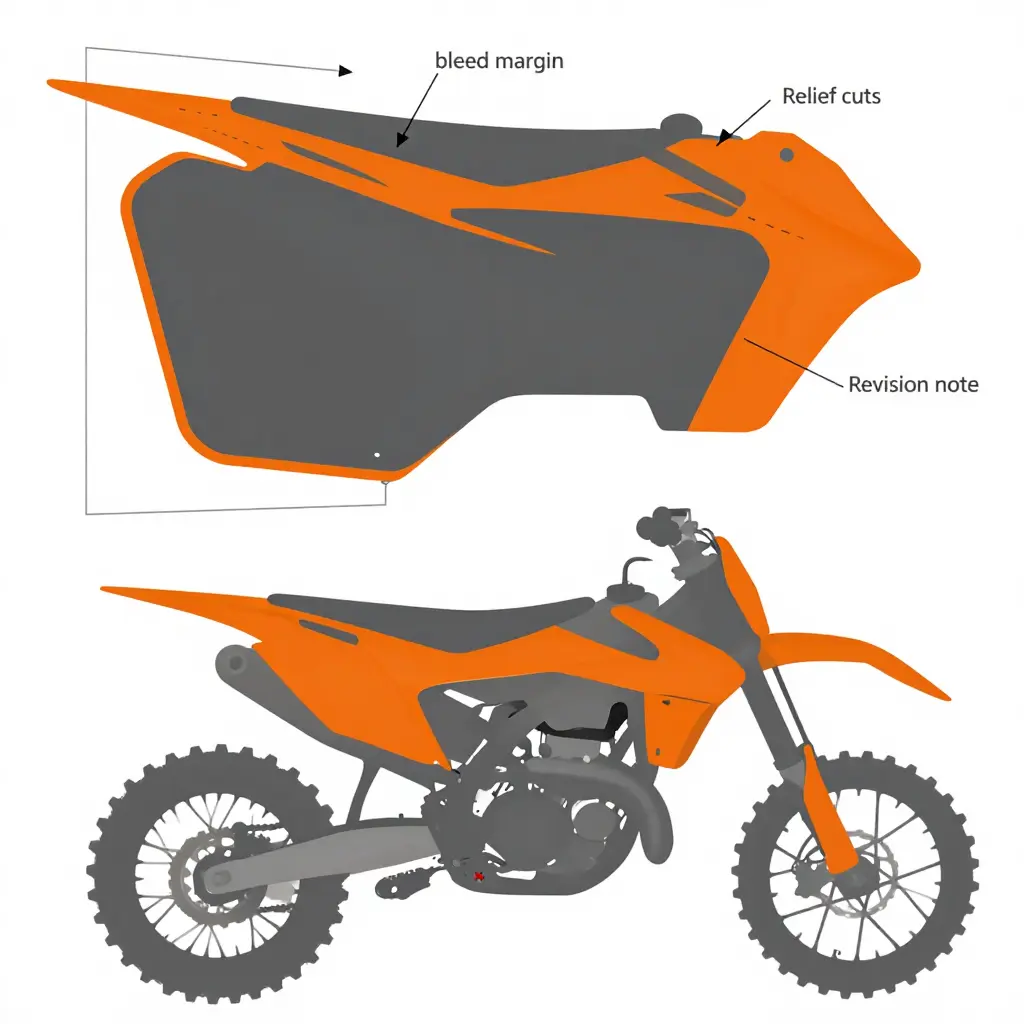
Once the crease pattern is confirmed at the shroud gap, the fix belongs in the artwork rather than on the bike. Open the master file and add relief cut paths at the shroud radius and along the lower tank edge so the vinyl graphics move with the shroud instead of bunching when tank swell pushes it outward. Revise the bleed in the same pass; most shops move from a 2 mm to a 4-5 mm margin so trimming drift and squeegee stretch no longer pull the printed edge inside the cut line. Then adjust panel overlap across the tank shroud gap, extending the upper panel 6-8 mm over the lower one and keeping the seam off the tightest part of the radius. Flatten transparencies, re-nest the sheet, export print and cut layers separately, and attach a version note to the file record covering the revision code, the date, and a one-line summary of the added relief cuts and overlap change.
Print shops should communicate the change openly instead of quietly shipping a different file. Reference the original order number, state the new revision code, confirm that the corrected layout supersedes the earlier one, and place existing stock on hold so old panels are not mixed into new orders. Customers should receive a short proof showing the relief cuts and revised overlap, along with a reminder that the previous kit must be removed and adhesive residue cleaned before the new set goes down.
DIY installers can request the same correction from their supplier by quoting the order number, the bike model, and whether an aftermarket tank is fitted, then asking for a cut-ready file or pre-cut set that includes relief cuts plus the updated overlap and bleed. A photo of the crease at the gap helps the supplier confirm that the revision matches the reported tank swell. Installers working from an existing library can benchmark the changes against established patterns such as KTM graphics to verify that the new overlap sits correctly before cutting a full set of custom dirt bike graphic kits.
What Actually Causes Creasing at the Tank Shroud Gap
The doughnut chart below breaks the root causes behind creasing at the tank shroud gap into five labelled segments, so you can match your own situation to the most likely culprit.
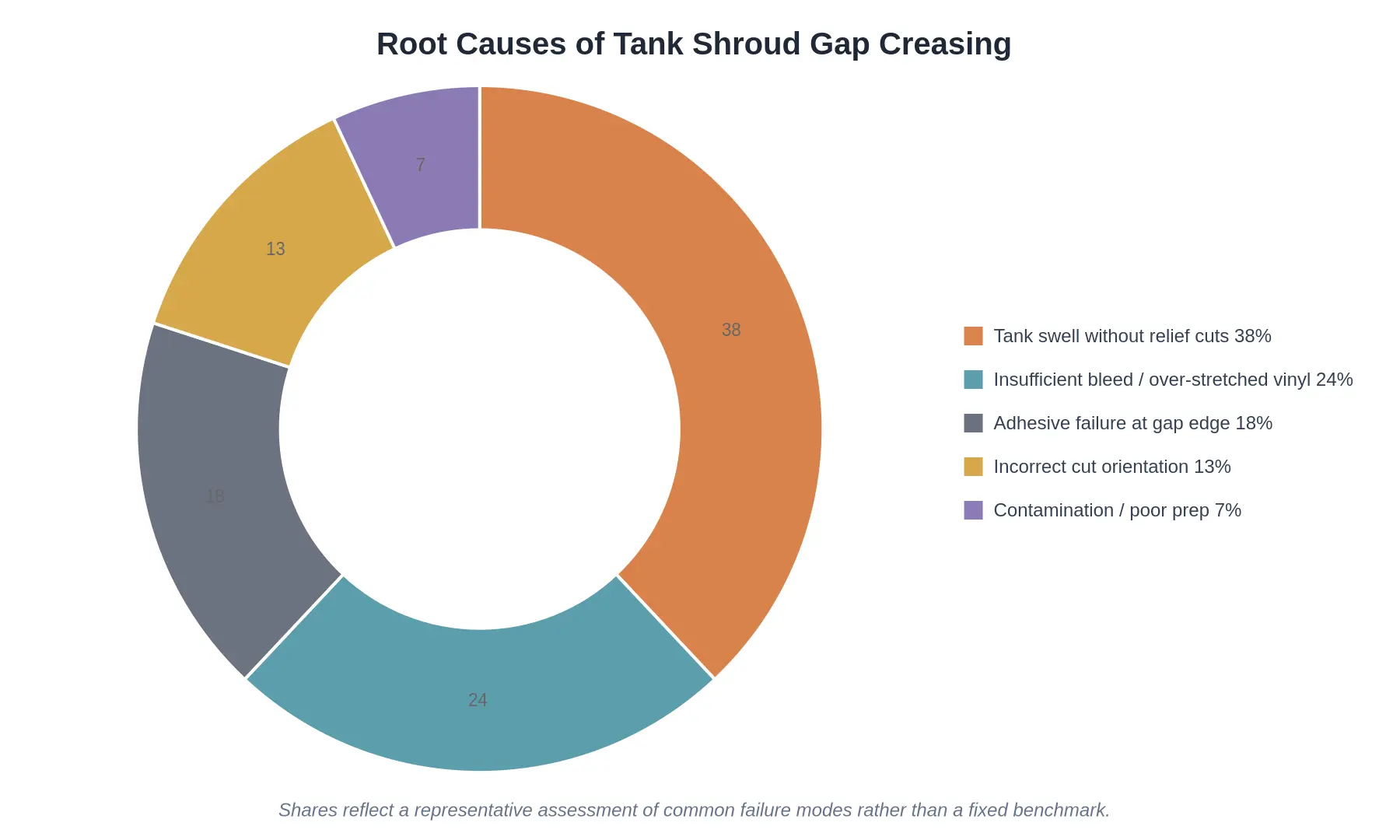
Shares reflect a representative assessment of common failure modes rather than a fixed benchmark.
Reading the Breakdown
- Tank swell without relief cuts (38%) – The single biggest driver. A plastic tank grows and shifts under heat and fuel load, and a kit cut as one continuous sheet has nowhere to move. The vinyl has to go somewhere, so it folds.
- Insufficient bleed / over-stretched vinyl (24%) – Pieces trimmed too tight or stretched hard during application lose their stored elasticity and lift or ruck at the seam.
- Adhesive failure at the gap edge (18%) – Contamination, cold application temperatures or too little post-heat leave the edge unseated, letting the material curl back on itself.
- Incorrect cut orientation (13%) – Cutting across the grain of the film rather than along it reduces stretch and concentrates stress at the gap.
- Contamination / poor prep (7%) – Leftover release agent, wax or dust creates a dead zone where adhesion never fully develops.
The top two causes come to 62% of the sample, and both are design and prep problems rather than product faults. That is why adding relief cuts before a reprint clears most cases in one pass.
If you are reprinting a kit for a specific platform, start with a proven template so the relief cut geometry and panel overlap are already worked out – for example, these KTM graphics kits are laid out with the tank shroud gap in mind.
FAQ: Relief Cuts and Tank Shroud Creasing
How wide should a relief cut be?
Keep each relief cut narrow, typically 2-4 mm (about 3/32 in) wide, sliced with a fresh #11 blade so the vinyl can fold shut on itself instead of opening a visible slit. Length matters more than width: run the cut 10-15 mm past the edge of the tank shroud gap so the film has somewhere to travel during tank swell. Anything wider than 5 mm reads as a gap from three feet away and turns into a dirt trap.
Do relief cuts weaken the vinyl graphics?
No. A correctly placed relief cut releases load that would otherwise lift the adhesive or peel an edge, so the graphic stays put longer than an uncut panel. The only real risk is blade depth, so keep the tip shallow and angled away from the shroud; tape the surrounding area if you need a depth stop. Cuts made inside the tank shroud gap sit under the shroud overlap, so they cost nothing visually.
Are relief cuts needed on both one-piece and multi-piece kits?
Yes, both. One-piece kits carry more continuous vinyl across the tank shroud gap, so they need two or three staggered cuts to spread the load, while multi-piece kits usually need just one cut per seam edge. If you are ordering custom dirt bike graphic kits for KTM models, ask your printer to mark the relief locations on the transfer tape before shipping.
How long does the fix hold as the tank keeps swelling and contracting?
A correctly sized relief cut holds for the life of the kit, because it gives the vinyl a fixed place to flex instead of stretching and creasing. Fuel and heat cycling will keep the tank moving, so check the cut edges at every wash and re-seat any lifted corner with a heat gun at 60-70 C. Refresh the cut only if the slit has closed up and the flanks have started to ride over each other.
Can an already-installed kit be saved without a reprint?
In most cases yes, as long as the crease has not fractured the clear or ink layer. Warm the area, lift the edge back to the crease, cut a 2-4 mm slot through the relief point, reapply with a squeegee from the centre outward, and finish at 70 C. Only a crease with visible white ink cracking justifies a reprint.
Sourcing Kits and Verifying the Template Handles the Tank Shroud Gap
Source replacement or updated graphics from a supplier whose catalogue is built around your exact frame and bodywork revision, not a universal sheet trimmed to fit. Start with the model and generation, then ask which tank state the artwork was digitised on, because a template traced on a cold, empty tank will place the relief point where the plastic no longer moves. A set of 79BIKE graphics drawn from a current library is usually traced on a tank photographed at operating temperature, which is why the shroud relief lands where the plastic actually swells. Riders on light electric motos should order E Ride graphics with a separate battery-cover panel, since a single backing stretched across the shroud gap will bridge and crease the first time the pack expands. On full-size electric MX bikes, request Stark Varg MX/EX graphics by battery generation, as earlier templates set the rear shroud relief a few millimetres off, and that small offset is enough to pull a crease under heat. Smaller platforms follow the same rule: ReRode R1 graphics need the tail section confirmed as its own panel rather than an extension of the shroud, while Arctic Leopard graphics should arrive with a note stating which bodywork revision the cut file was drawn against.
Conventional motocross bikes are the other half of the story. KTM graphics have to be matched to the plastics generation, because shroud mounting points shifted between model years, and a file built for the previous shell will fight the new tank gap instead of relaxing into it. Within the Sur-Ron family, order Surron Light Bee graphics cut for your specific battery-box revision, then verify that the Surron Ultra Bee graphics template splits the shroud gap into two panels rather than spanning it. Surron Hyper Bee graphics are newer and less standardised across printers, so ask for a cut-path preview before anything goes on the printer.
Talaria platforms are where template drift shows up most often. Talaria XXX graphics should include the shroud relief notch as a printed feature of the file, not as something the installer cuts freehand on the bike. Talaria MX3/MX4 graphics share a template family but not identical shroud mounts, so confirm which chassis the artwork was traced from. Likewise, Talaria MX5 graphics and Talaria Komodo graphics should be supplied with the tank shroud gap already separated in the cut file, so your relief cuts have a defined edge to follow.
Questions That Reveal Whether the Template Already Accounts for the Gap
Five questions cover most of it, and the answers usually come back quickly:
| Question to ask the supplier | Why it matters | A strong answer looks like |
|---|---|---|
| Which bike, year, and bodywork revision was this template traced on? | Shroud mounts and gap position shift between revisions. | A specific year and revision code, plus a photo of the source bike. |
| Is the tank shroud gap split into separate panels or bridged? | Bridged backings crease as soon as the tank relaxes outward. | Two panels with a defined gap, or a printed relief notch. |
| Does the cut file include relief cut positions and registration marks? | Cutting relief before printing avoids rework after installation. | A 1:1 PDF or cut path you can review at full size. |
| Which film is used, and is it rated for flexible plastics? | Cast or hybrid films conform to compound curves without lifting. | A named product plus a stretch or conformability figure. |
| Can you send photos of this exact kit installed on a swollen tank? | Installed proof beats a flat render every time. | Photos showing the shroud gap sitting flat after a heat cycle. |
Before You Reprint
Once the template checks out, add your relief cuts to the artwork file rather than the installed sheet. Print a 1:1 paper proof, lay it over the shroud with the tank at operating pressure, and mark where the panel wants to gather. If the supplier’s file already separates the gap, align your cuts to that edge and keep them short and rounded; if it bridges the gap, either request a revised panel split or cut the relief yourself before the vinyl touches plastic. Do the same for material: specify a conformable cast or hybrid film, confirm the adhesive is rated for polypropylene bodywork, and test one scrap piece on the shroud curve before committing a full kit. New graphics that crease at the gap were never a printing problem; they were a template problem, and you can now catch it before the roll is loaded.
The crease is not a random defect. When the tank swells, the shroud gap narrows and pushes a compressive load into the vinyl sitting across it. A graphic with no release geometry has nowhere to send that load, so the film folds and locks into a hard crease. Relief cuts change where the load goes: the extra cut lines in the artwork let the film close up in short spans across the shroud gap instead of bunching, so it stays flat through the swell cycle.
Work through the fix in order: measure the gap under load, mark the crease line, cut the relief geometry, revise the file, test a printed sample on the bike, then reprint. Any custom dirt bike graphic kits built for a swelling tank should carry that same geometry. Inspect the shroud gap at each service interval and after any long heat cycle, because the tank swells and contracts repeatedly, and a cut that looked adequate on a cold tank may not be enough once the tank is warm.