
Graphics Get Read at Distance First
Graphics are judged from a distance first and inspected up close second. A rider’s first look comes from the track fence, the parking row or the staging gate, and by the time anyone leans in to check print quality the design has already been read. That is why distance legibility sets the linework, and close-up detail only gets whatever survives it.
Zoom a vector file to 400% and the hairlines look crisp. Put the same file on a complete bike and step back 20 feet: the lines merge into gray, and the scheme reads as clutter instead of an identity.
Two variables decide the outcome, line weight and line spacing, and tight shroud curves make both worse. Spacing compresses on the inside of every bend and opens on the outside, so parallel strokes crowd, converge and blur into texture. Fine linework has to survive that compression, which is the test we apply to every kit we produce, including our KTM graphics range.
The 20-Foot Readability Threshold
At 20 feet, detail does not fade out gradually. It crosses a threshold. Apparent stroke width depends on viewing angle: a 0.3 mm hairline subtends roughly 1.7 arc minutes at 2 feet but only about 0.17 arc minutes at 20 feet, well below the level at which the eye separates ink from background. Shape and weight need about 1 arc minute, which works out to roughly 0.09 mm of stroke per foot of viewing distance: 0.9 mm at 10 feet, 1.8 mm at 20, 4.5 mm at 50. Under that, a line stops describing a shape and starts reading as tone. Spacing obeys the same geometry. Two adjacent lines stay separate only while the gap between them resolves, so squeeze the gap and parallel hairlines collapse into a single dark mass.
Three terms do most of the work here:
| Term | Definition |
|---|---|
| Line weight | The cut or printed thickness of a single stroke, measured in millimeters. |
| Line spacing | The clear distance between the center-lines of two adjacent strokes. |
| Negative space ratio | The proportion of open, unprinted area within a given graphic region. |
Printed decals and cast vinyl wraps obey the same geometry, because both are cut, weeded and laminated at the same scale: a hairline that disappears on a proof print disappears on applied film too. Heavy layered linework therefore only survives on flat panels, which is why KTM-specific custom dirt bike graphics work best designed for a 20-foot read first and inspected up close second.
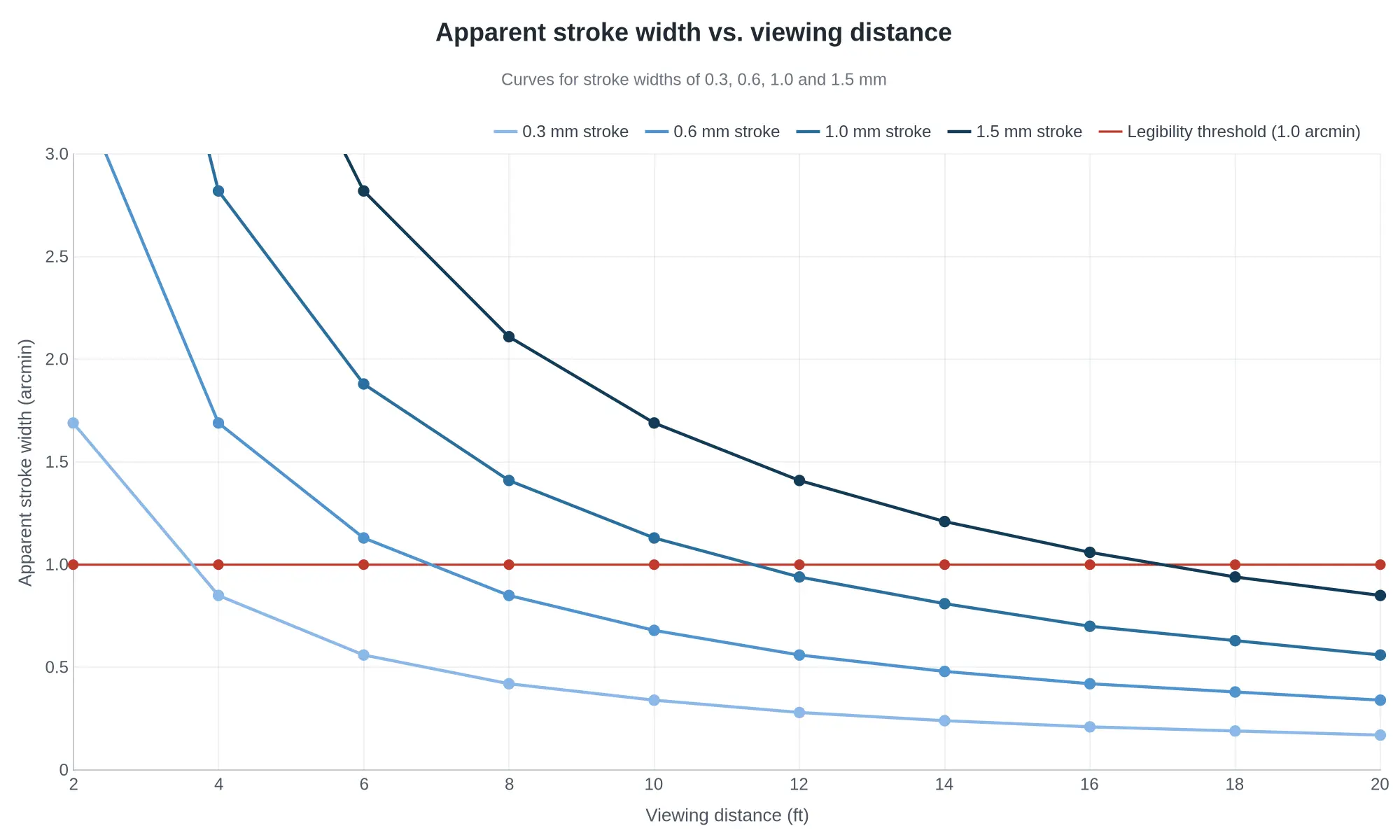
Before you commit to a set of custom dirt bike graphics, decide where the bike will actually be seen and plan the linework around that distance. Our KTM graphics range shows how production kits balance bold shapes with restrained fine detail.
Recommended Linework Specifications by Viewing Distance
| Viewing Distance | Minimum Line Weight at 1:1 Scale (mm) | Minimum Gap Between Parallel Lines (mm) | Suggested Maximum Detail Elements per Shroud Panel | Notes |
|---|---|---|---|---|
| 5 ft (1.5 m) | 0.45 | 0.70 | 40 | Hairline gradients and stipple shading read cleanly here; keep the gap at least 1.5x the stroke width. |
| 10 ft (3 m) | 0.90 | 1.40 | 28 | Hold negative space at roughly 30-40% of panel area so adjacent shapes stay visibly separate. |
| 20 ft (6 m) | 1.80 | 2.70 | 16 | Floor specification: cut any line that does not describe an edge, shadow boundary or logo shape. |
| 30 ft (9 m) | 2.70 | 4.00 | 12 | In curvature zones tighter than a 40 mm radius, add about 15% to every stroke to offset foreshortening. |
| 50 ft (15 m) | 4.50 | 6.70 | 8 | Design for silhouette only; treat the panel as 6-8 large shapes with no internal texture. |
Read the table as a filter rather than a target list. Start at the distance the bike is actually seen from, treat the line-weight and gap figures as floors, and count detail elements as discrete shapes per panel; if a draft exceeds the number for your distance, merge or delete elements instead of shrinking them.
Shroud Curvature Distortion and Artwork Warping
A shroud panel is not one gentle curve. It is a compound surface: convex here, concave there, a ridge line down the middle and a bulge where the radiator sits behind it. The artwork you draw is flat, so every square millimeter of that surface has to come from somewhere, and it comes out of the linework.
Radius tightens at the panel edges, along the ridge lines and over the radiator bulge. There the vinyl bends in two directions at once, horizontal lines draw closer together and vertical lines lean in. The graphic compresses in those zones and stretches across the flatter center. A uniform hairline grid cannot absorb that evenly: the compressed zones darken, gaps close up, and the whole panel reads as crowded from a distance.
Fix it before the file reaches the printer. Pre-distort the artwork in your vector editor: widen gaps in high-curvature zones, thicken strokes slightly where the spacing will collapse, and keep the densest linework off the tightest radii. As curvature rises, detail density falls. Reserve fine linework for the flattest zones, the only places it survives intact. It is a matter of budgeting detail instead of decorating the whole decal.
This matters most for custom dirt bike shroud graphics, where a supplied design is stretched over very different panel shapes, and it applies equally to motocross graphics kits with dense sponsor-style detailing. The diagram below maps how an even grid compresses across a compound-curved panel, and where to pre-distort it.
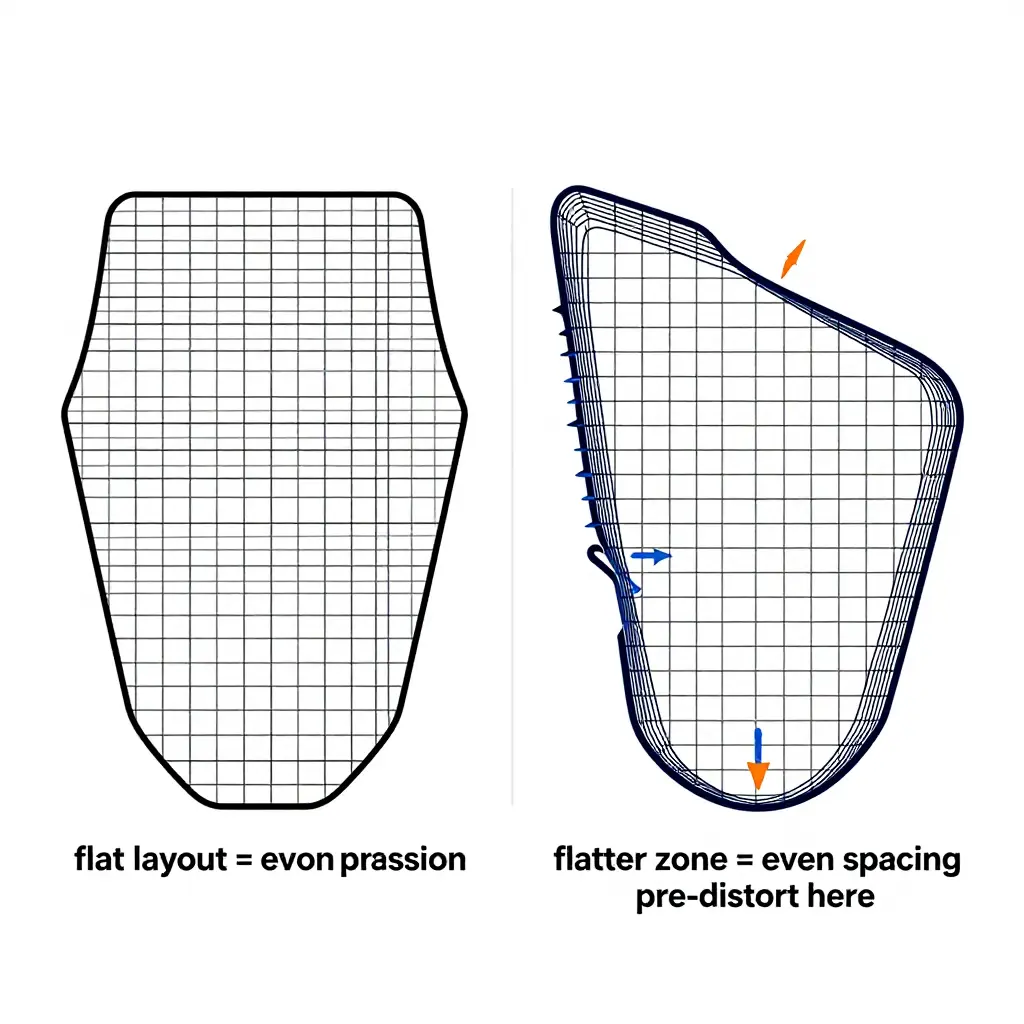
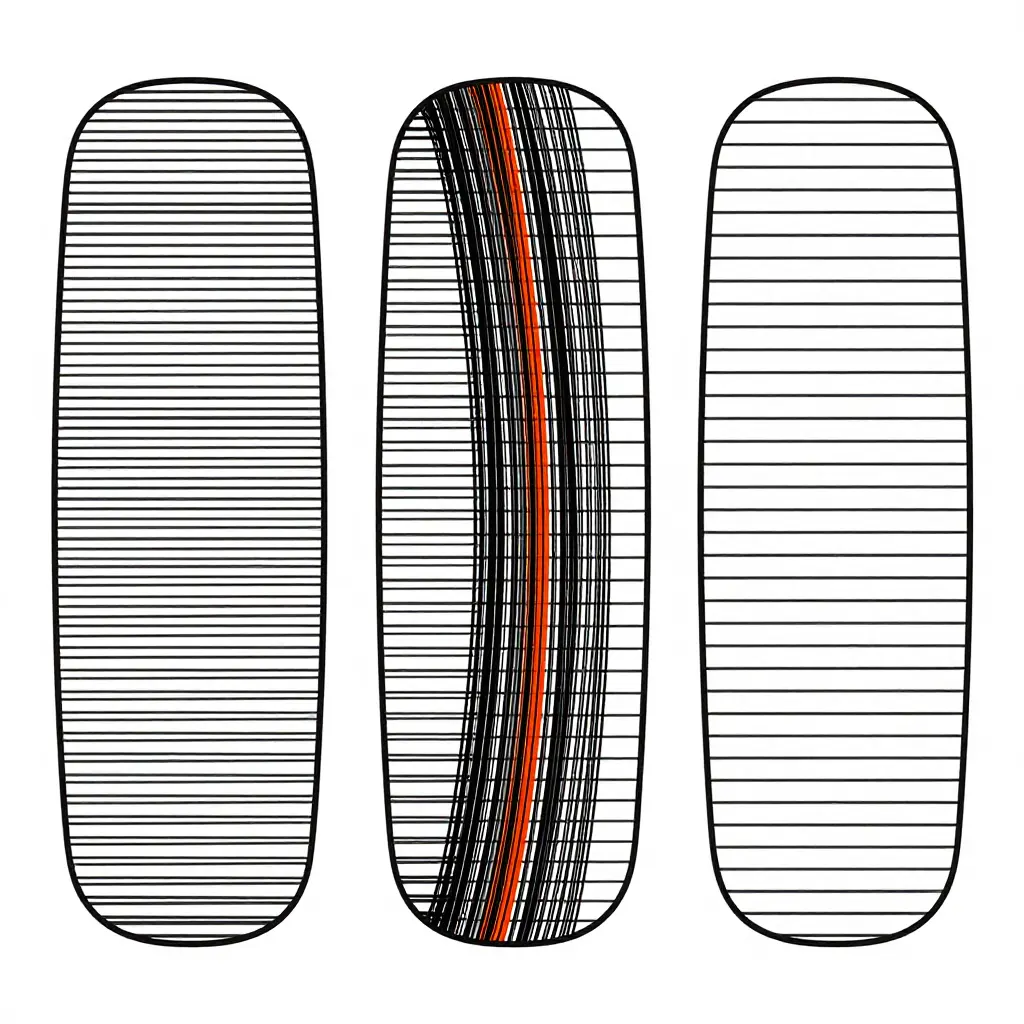
Left to right: even spacing holds on a flat panel; the same line count bunches, darkens and turns to noise at a tight curved edge; fewer, wider-spaced lines carry the same visual weight around the shroud.
Use that as a gut-check before you approve a proof. If the design looks like the middle panel where it wraps the shroud, thin the detail until it reads like the right one.
Linework Reduction Rules
Distance kills fine detail: crisp on a 27-inch monitor, mush from the pit wall. Before you approve any set of custom dirt bike graphics, run the artwork through these seven rules.
- Delete the thinnest stroke tier entirely: if the file carries three or more weights, drop the smallest.
- Raise the minimum line weight to the floor for your viewing distance, 1.8 mm for a 20-foot read and never below the value in the table above.
- Widen the gaps between parallel lines to 1.5x the stroke width, about 2.7 mm at 20 feet.
- Convert any run of three or more parallel hairlines into one solid shape.
- Remove every outline drawn inside another outline, keeping one contour per form.
- Keep dense detail off the bends: leave the first 10 mm of each shroud bend clear.
- Proof the file at 100% scale, viewed at 20 feet, before approval.
Perceived Linework Clarity vs. Viewing Distance
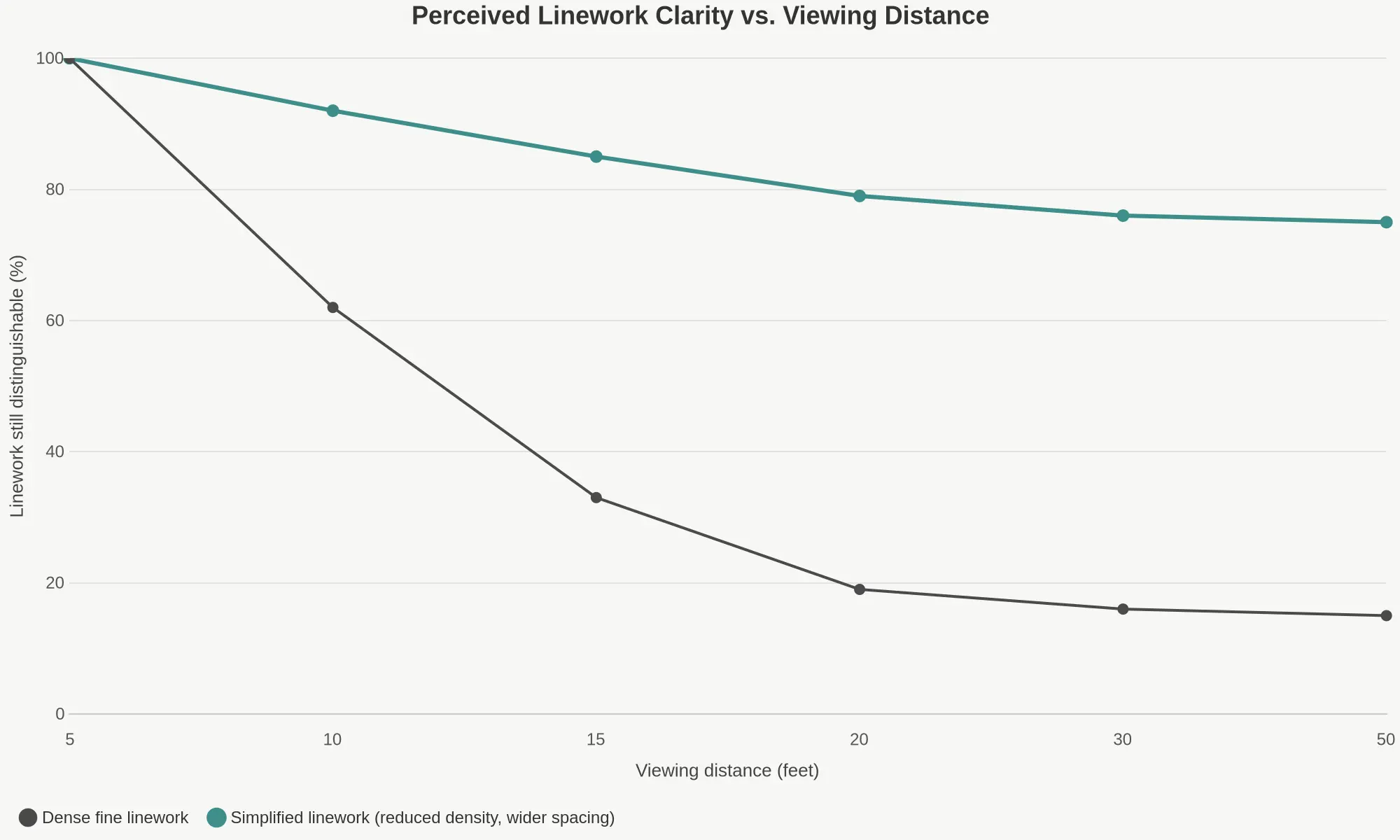
Clutter is not a matter of taste. It is a reading-distance problem. On a tight shroud curve, fine lines compress into each other long before a rider gets close enough to appreciate them. The chart plots how much of a graphic’s linework stays visually separable as you step back, comparing a dense fine-line layout with a simplified one built on lower density and wider spacing.
Reading the Curves
- Dense fine linework loses roughly two thirds of its legibility by 10 feet, then drops off a cliff between 10 and 20 feet and bottoms out near 15%.
- Simplified linework gives up very little in the first 15 feet and holds around 79% at 20 feet.
- Past 20 feet, more detail buys nothing: both curves flatten, so added strokes only add noise.
That crossover is why simplification gets prescribed at 20 feet. By then dense work has collapsed to roughly 19% while simplified work still reads near 79%. It is also the difference between a bike that looks deliberate in the pits and a smudge you cannot read from the far side of the track.
So sketch the layout, then look at it from 20 feet, on screen or as a printout taped to the wall, before you send it to print. If the shapes do not survive, thin the line count, open the spacing, and check the result against the shroud’s tightest curve. Finished layouts in our KTM graphics range show what controlled density looks like in production.
Palette Discipline and Negative Space
Sometimes the clutter at 20 feet has nothing to do with linework; it is a palette problem. Limit a set of custom dirt bike graphics to two base colors plus one accent, so adjacent linework separates on value instead of merging into a single gray texture. Then apply the same restraint to shapes. A model-specific KTM graphics range shows how far two colors can carry contrast across a tight shroud curve.
Replace hairline shading and hatching with solid shapes, knockouts and open space. Hatching reads as tone at arm’s length and as mush from across the paddock, and it is the detail that fails first when a wrap is cut, weeded and laminated. Keep the negative space ratio high around type and primary marks, and never stack outline on outline: once every element gains a border, the decal loses its hierarchy.
Solid shapes also survive cutting, stretching and clear-laminate abuse better than dense hairlines, which is why bold motocross graphics outlast fussy ones. For color-blocked contrast that still reads at distance, browse the Arctic Leopard graphics range for model-specific fit.
Vector File Preparation and Scale-Accurate Proofing
Set a minimum stroke width in millimeters at 1:1 scale before you export anything, and take the figure from the table above for the distance you are designing for. Then convert every stroke and font to outlines so nothing re-renders or substitutes when the file reaches a different RIP or plotter.
Next, purge hidden duplicate paths and stacked near-identical paths. They double-cut, bridge small counters and visibly thicken the edge of a decal. Never upscale bitmap artwork beyond its original resolution, and keep any raster support art at 1:1 so pixel steps stay invisible.
Finally, proof a printed or on-screen template at true bike scale, and again at simulated distance, before you approve. A shop-ready file states the viewing distance it was designed for and the curvature zones the artwork was warped for, which is the approach behind our Stark Varg graphics and Surron Light Bee graphic kits.
Read the Shroud as a Design Map
Most cluttered graphics do not fail because the artwork is bad. They fail because fine detail landed in the wrong part of the panel. The diagram below strips the shroud back to geometry so the placement logic is visible at a glance.
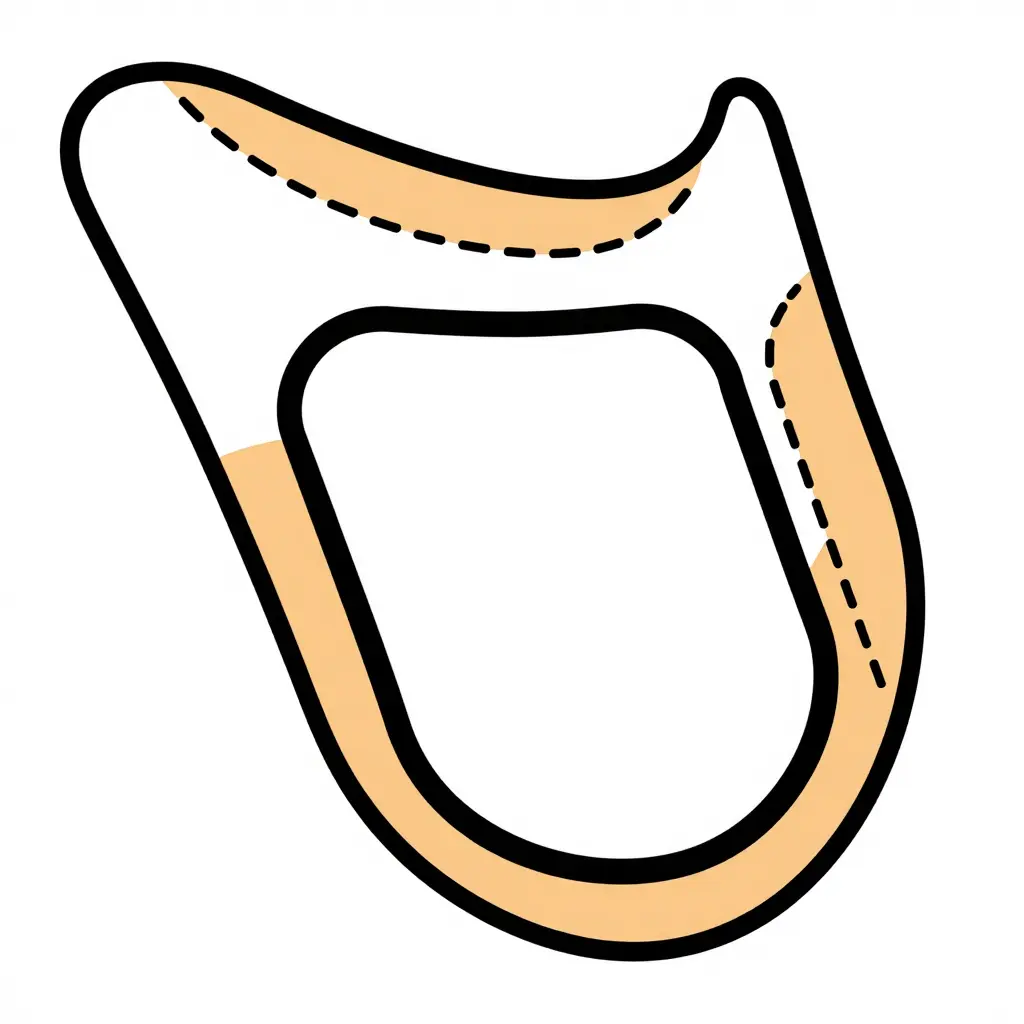
What Each Zone Is Telling You
- Outer edge margin (thin solid line): the strip nearest the panel edge. Keep it deliberately quiet. Edges get trimmed, wrapped and flexed during installation, and hairline detail there tends to be swallowed or torn.
- High-curvature band (dashed outline, accent tint): the tightly rounded corner where vinyl has to stretch. Bold shapes, thick strokes and generous spacing survive here; script lettering, dot patterns and 0.5 mm linework do not.
- Central low-curvature zone (solid outline): the broad, flatter area. This is the only zone that earns dense detail, including the geometric blocks shown in the sketch, which stand in for logos, numerals and layered line art.
A Quick Placement Cheat Sheet
| Zone | Stroke Weight | Detail Density | Typical Content |
|---|---|---|---|
| Outer edge margin | Light | None | Breathing room only |
| High-curvature band | Heavy | Low | Solid shapes, thick accents, swept color breaks |
| Central low-curvature zone | Medium to fine | High | Type, numerals, layered line art, sponsor marks |
Draw those three boundaries before you sketch and the question stops being “does this look busy?” asked while hunched over a laptop. It becomes something you answer from 20 feet away, which is the only distance that matters on a track. Riders who want a baseline that already respects these margins can browse KTM shroud graphic kits and compare how the strong designs push weight into the center and let the edges rest.
FAQ: Fine Linework and Shroud Curvature
Is my artwork too detailed for 20 feet?
Print the artwork at 1:10 scale, tape it to a wall, and step back 2 feet; that simulates 20 feet at full size. If lines under 1.8 mm merge into gray noise or vanish, simplify before ordering custom dirt bike graphics.
Can thin lines simply be thickened to fix clutter?
No. Thickening every stroke multiplies ink coverage and flattens the hierarchy. Delete 30-40% of the secondary lines, take the remaining primary strokes to 2-3 mm, and hold 1.5x the stroke width between parallels so shroud curves stay legible.
How do I adapt a detailed design to tight shroud curves without redesigning it?
Flow-map the art onto a shroud template, then test every bend: below a 40 mm radius, stretch motifs 10-15% along the curve axis, cut strokes that cross the bend, and keep 10 mm clear of edges. See pre-flowed 79Bike graphics layouts for reference.
Does dense linework affect decal durability?
Yes. Dense fine linework forces cut paths together, so vinyl islands lift during installation, and ink packed on high-curvature edges flexes harder. Keep 1.5x the stroke width between cut paths, specify cast laminate, and pull all detail 10 mm back from tight shroud curves.
How do I brief a design shop on distance and curvature expectations?
Give the shop three numbers: viewing distance (20 feet), minimum line width (1.8 mm at 1:1), and your shroud’s tightest bend radius. Attach ruler-scaled shroud photos and mark no-detail zones near the bends; E-Ride graphics product pages list these specs.
Conclusion: One Working Order of Operations
Design and approve in a single sequence: line weight first, then spacing, then curvature-aware placement. Thicken or delete the thinnest strokes before anything else, because linework that survives a close look but vanishes at 20 feet is wasted ink. Tighten the spacing next so the composition holds as one shape, then move detail away from the sharpest shroud curves.
The target stays plain: the artwork has to read as a clean composition at 20 feet, and reward close inspection after that. Dropping detail is a design decision, not a quality compromise. The same logic holds across model-specific ranges, whether you are proofing ReRode R1 graphics, Talaria MX5 graphics or Surron Ultra Bee graphics.